This chapter describes how to create your own data types for handling data that does not fit one of the existing data types. The concept of the "user-defined" data type is discussed and the syntax for the IRIS Explorer data typing language (ETL) is laid out.
The chapter provides examples of the typing language, as well as the specification for a new data type and code for modules that can use it.
All the data that IRIS Explorer manipulates must fit into a recognized IRIS Explorer data type. IRIS Explorer has several built-in data types that satisfy the needs of nearly all users and fit most scientific data; however, sometimes the existing IRIS Explorer data types do not adequately describe the data you want to visualize, hence the user-defined data type (UDT), designed specifically for the task at hand. For example, one might define a new data type for quantum dynamic calculations on molecules, along with a suite of modules to do the calculations and create geometric representations suitable for use by the other modules in IRIS Explorer.
IRIS Explorer provides a data typing language (ETL) for defining data types that can be passed among modules. Such data types are called root types. Using ETL, you can create a new root data type for use in custom-built IRIS Explorer modules, in the Map Editor, and in the Module Builder. The IRIS Explorer data types cxLattice, cxParameter, cxPyramid, cxGeometry, and cxPick were created using ETL and are examples of how to use ETL.
For a new data type to work in IRIS Explorer, it must have a C structure definition that can be used to build modules, as well as a description of the type that IRIS Explorer and the Module Builder can load at run-time. It is also useful to have a library of accessor functions that allow C, C++, and Fortran users access to the type with a minimum of programming. IRIS Explorer allows you to create all these things.
When you create a new data type, you have to define all aspects of the structure that IRIS Explorer may need to know at any time. You also need to write new modules to accept, process, and output the data conveyed in the new data type, so the design of your data type should be carefully thought out.
Most users will find that the standard IRIS Explorer data types are sufficient for their needs. Furthermore, a large number of modules are already built to handle the standard data types. For those with data from specialized domains, the effort to define a new data type is relatively small; however, the true cost of using a new type effectively is considerably greater because of the larger investment in module writing.The creation of new types, therefore, is best suited to those users already intending to write a suite of new modules.
IRIS Explorer data types consist of a root data type and, optionally, one or more subsidiary data types. The root data type is the named structure that appears as a data type on module input and output ports and can be passed between modules.
The subsidiary data types expand the functionality of the root data type but cannot stand alone on a port. For example, cxConnection and cxPyramidDictionary are subsidiary data types used in defining the root data type, cxPyramid. All these type definitions are collected together in a type declaration file.
Data type descriptions reside in type declaration files, which end with the suffix .t (for "type"). You create and name the type declaration file when you define the new data type.
This is the basic structure of a modulename.t file:
#include <---->
#include <---->
...
root typedef struct {
..
} RootTypeName
shared typedef struct {
...
} Name1
closed typedef struct {
...
} Name2
typedef struct {
...
} Name3
The keywords used in each type definition are defined in "Syntax" later in this Chapter.
As can be seen from this outline of the modulename.t file contents, the root type is a struct, similar to a C structure. The building blocks of the type include other structs, enumerations, unions, and arrays of any of these.
All data types have names. The naming conventions are similar to those in C, that is, the first character must be a letter, but the rest of the name may contain digits and the underscore (_). Data type names may be of any length and case is significant. The type filename and data type name must agree. For example, if the data type is to be called gnBase, the file must be named gnBase.t. If the file is named bxMyCylinder.t, the data type must be called bxMyCylinder.
A single type declaration file may contain several type declarations if the root data type contains subsidiary data types. The order of data type declarations in the file is not important; they are sorted during the translation into C.
The IRIS Explorer data typing language resembles the structure definition syntax of C in many respects. It uses the constructions typedef and struct, and a construction similar to union, called switch.This section takes an in-depth look at the typing language, including the definition of its syntax and some examples.
The presentation of the syntax follows the format used in The C Programming Language, Second Edition, by B.W. Kernighan and D.M. Ritchie (Prentice-Hall, 1988). The syntax and some discussion of the restrictions placed on forming compound types follow.
These conventions apply in this chapter:
There is a small set of special keywords used in defining an IRIS Explorer data type.
There are special language symbols for a few of these keywords.
Other keywords are used in-place in subsequent sections of the language definition.
Declarations in the IRIS Explorer typing language (ETL) are more constrained than in C. These are the basic rules for data type definitions:
There is a a standard naming convention for data types defined by IRIS Explorer. A standard scheme makes it easy to recognize the different forms of names used in a type and to identify their purpose.
Here are the standard IRIS Explorer conventions:
typedef struct { } cxData;
typedef struct { } cxPyramidDictionary;
long nDim; long dims; cxPrimType primType;
typedef enum {
cx_compress_none,
cx_compress_unique,
cx_compress_multiple
} cxCompressType;
typedef enum {
cx_prim_byte,
cx_prim_short,
cx_prim_long,
cx_prim_float,
cx_prim_double,
cx_prim_string
} cxPrimType;
These are the basic scalar types that IRIS Explorer will accept.
| Scalar Type | C | Fortran |
|---|---|---|
| char | char type | |
| short | short type | |
| int | int type | integer type |
| long | long int type | integer type |
| float | float type | real type |
| double | double type | double precision type |
| string | null-terminated string | character type (converted to null-termination) |
The grammar fragments are:
There are also sign modifiers for the base_integer types, namely:
According to the C language specification, scalars of type short, int, and long whose type is not specified are considered signed. Also, in IRIS Explorer char scalars whose type is not specified are considered unsigned, independent of the local compiler interpretation of char. For example, on some machines, the C compiler treats char as unsigned, but the C++ compiler treats char as signed. IRIS Explorer typing forces char to unsigned char to ensure that both languages treat an IRIS Explorer char variable identically.
You can define, as a new type, an enumeration of consecutive named constants starting at zero.
An IRIS Explorer type includes structures composed of the basic scalar types in three forms:
The composition rules may be applied both to scalars and to other composed types. Thus, you may construct an array of integers, and also an array of enumerated constants, structures, unions, or arrays. The language syntax for these elements is shown below.
struct is an IRIS Explorer structure, almost identical in syntax to the C structure into which it is transformed. It looks like this:
You must define switch discriminator and array subscript variables within the same struct definition as the switch and array variables to which they refer.
switch is an IRIS Explorer union, declared as a named structure, and indicating a discriminator member that can indicate which variant of the union to consider at run-time.
The structure looks like this:
DISCRIMINATOR is a name of type enum_type; CONSTANT is a name that is a possible value of type enum_type. For example, cx_prim_type.
In C, it is possible to declare a structure without defining that structure as a new type. In IRIS Explorer, you must name all new types in order to declare members of that type. The typedef statement defines a new type from a simple type, a struct, or an enumeration. It can also be used to create a new type from a previously created type, in effect creating a pseudonym for an existing type. These operations are defined below:
STANDARD_TYPE is a name of type standard_definition; REFERENCE_TYPE is a name of type reference_count_definition
Both C header files and other IRIS Explorer type files (with a .t suffix) may be included into a type file using the standard C preprocessor syntax, which uses a # character in the first column. If a file TypeA.t needs definitions from file TypeB.t, it must include TypeB.t in a #include statement.
Inclusion of an IRIS Explorer type file has the effect of incorporating the included file into the current typing file. This allows you to reuse previously defined types; for example, the cxPyramid type uses the cxLattice type. Inclusion of a modulename.t file also means the corresponding modulename.h file will be included in the resulting C header file.
Inclusion of a C header file has no effect on the actual type processing, but only serves to put the same include statement into the resulting C header file.
FILENAME is a name referring to a file in the file system, located in $EXPLORERHOME/include/cx or in the current directory.
There are two forms of structures in the IRIS Explorer typing language: in-line and reference-counted structures. Reference-counted structures are denoted by the root and shared keywords in the typing language. Both keywords imply reference-counting, but root has other meanings as well, described below.
In-line structure members reside contiguously with the preceding and following members in the enclosing structure.
Thus, the following example creates a twoInt structure named two with two members, two.a and two.i.b:
typedef struct {
int b;
} oneInt;
typedef struct {
int a;
oneInt i;
} twoInt;
twoInt two;
The actual storage layout of two is contiguous, with member a followed by i.b. Member names in this example are two.a and two.i.b.
The grammar fragment is:
Reference-counted structure members do not reside contiguously with the preceding and following members in the enclosing structure. Rather, the entire structure occupies its own section of memory and is referenced by a pointer. The following example creates a twoFloat structure named two with two members, two.a and two.i->b:
shared typedef struct {
float b;
} oneFloat;
typedef struct {
float a;
oneFloat i;
} twoFloat;
twoFloat two;
The actual storage layout of two is the value of a followed by the address of an instance of a oneFloat. Member names in this example are two.a and two.i->b.
The grammar fragment is:
For more on reference counting, see "Understanding Reference Counting" in Chapter 9.
There are two differences to be noted in accessing the in-line and the reference-counted structures.
The first difference is that a shared member will always be a pointer to a structure, rather than an in-line structure. An array of a shared type is really an array of pointers to shared structures.
The following example shows a structure member two with two members, two.n and two.i, where the several double precision numbers in two are two.i[j]->b, for values of j between 0 and n-1:
shared typedef struct {
double b;
} oneDouble;
typedef struct {
int n;
oneDouble i[n];
} doubleArray;
doubleArray two;
The second main difference, and the reason why there is a distinction between in-line and reference-counted of structures, is that the reference-counted structure has some additional information that allows the structure to be shared between two or more data sets. Because the reference-counted structure is referred to by a pointer, several data sets can hold the same pointer: a single update of the shared data affects all data sets. It is impossible for two or more structures to share a single in-line structure.
Note: The user should not change values within the reference-counting structure, nor rely on the form or content of that structure, as it is subject to change in subsequent releases of IRIS Explorer.
The cxData and cxCoord types are implemented within a cxLattice as reference-counted structures. This means that several lattices could share data or coordinates, for example to allow the same data values to be mapped simultaneously onto several coordinate mappings without duplicating the (potentially large) set of data.
In addition to the reference-counted meaning of the root keyword, root also implies that the type is visible as the type of an IRIS Explorer module's port. For example, cxLattice is a root type and is a legal port type, but cxData (contained in cxLattice) is a shared type, but not a root type, and is thus not a legal port type. Hence root implies shared, but shared does not imply root.
At most, one variable may be declared in each member statement. This is distinct from the C style, where multiple variables of the same type may be declared together. The grammar fragment is:
simple_type VAR;
For example, this is legal in IRIS Explorer:
int a; /* Legal */ int b;
but this is not:
int a, b; /* Illegal */
The most general form of a member declaration is:
However, the example
simple_type VAR;
is actually much simpler than the general form. It has no closed keyword, uses an integer simple_type, is not an array, and has no label.
Other simple-typed members include:
int a; unsigned long b[n] "Value of B"; closed int c; float d[ a, a, 3 ]; double e "Real Number E";
Table 8-2 lists the parts of a simple-typed member.
| simple_type | Name | Bound | Label |
|---|---|---|---|
| unsigned long | b | [n] | "Value of B" |
You could also use common IRIS Explorer types in this example, where you use other defined_type types:
cxLattice a; cxLattice b[10]; closed cxLattice c "Not visible in Module Builder";
IRIS Explorer arrays can be dimensioned by a combination of integer constants, scalar integer variables, and arrays of integers. It is important to understand how the array declaration in the IRIS Explorer typing language translates into an array of bytes in memory and how to access that memory in C, C++, or Fortran.
All IRIS Explorer arrays are represented by 1-D arrays of memory. The indexing into this long array depends on the order of the array bounds in the array declaration. Array bounds are given in the normal Fortran order, so that the first bound represents the fastest varying index. For example, the following 3-D array ThreeD has shape m by n by p, with the m-based index varying fastest:
int m; int n; int p; int ThreeD[ m, n, p ];
The equivalent Fortran declaration is:
integer ThreeD(m, n, p)
The equivalent C or C++ declaration is:
Arrays can have integer constants or scalars as bounds. The constant or the value of the variable is used at run-time to determine the array length. Arrays can also have other arrays as dimensioning variables, as in the data array of cxLattice;
long nDim; long dims[nDim]; double values[nDataVar, dims];
In this case, the array contents are treated as a list of scalar values, so that the previous example is equivalent to the following one for nDim = 3:
long dims[3]; double values[ nDataVar, dims[0], dims[1], dims[2] ];
Thus the length of an array can be calculated as the product of all of its dimensioning bounds, where a dimensioning array (for example, dims) has a product equal to the product of its integer contents.
BOUND is a name of type integer or an array of type integer
Most members in a type should be assigned labels. Labels are used in the creation of automatically generated API routines for programmatic access to the data types. All members that are to be accessed through this API must have labels. Labels are also used in the Module Builder Connections window for data type member wiring.
Members that can get labels include scalars, arrays, and reference-counted structures. Members that do not get labels include in-line structures (see below), switch structures, and type definitions.
The author of the type file may assign labels to structure members. The label is a quoted text string following the variable name and optional array bounds. Table 8-3 shows how the scalars are labeled in a lattice.
| Scalar Type | Name[Bounds] | Label |
|---|---|---|
| long | nDim | "Num Dimensions"; |
| long | dims[nDim] | "Dimensions Array"; |
Most members of an IRIS Explorer structure are given a text label for use elsewhere in IRIS Explorer, for example, in creating automatically generated API routines. If the user does not supply a label on a member which requires a label, the IRIS Explorer type compiler assigns a default label computed from the member name.
IRIS Explorer makes some effort to ensure that no two assigned labels are identical, but does not try to avoid collisions between automatically generated labels and user-supplied ones.
VAR is an item of name.
IRIS Explorer type files use the standard C comment syntax, which is a block of text surrounded by the delimiters /* and */. Comments may be inserted anywhere in the file.
The IRIS Explorer typing system lacks certain features that C structure definitions offer. There are three obvious differences, discussed below.
The comma "," does not work in ETL as it does in C. You must define each variable on a separate line. For example, this structure in C:
typedef struct {
float x,y; /* Invalid in ETL */
} mine;
looks like this in ETL:
typedef struct {
float x; /* Correct in ETL */
float y;
} mine;
ETL must be able to calculate the size of every non-in-line structure it manipulates so that it can handle the transcription of data properly. To do this, it needs a name for the structure.
This means you must use a typedef statement to name all such structures, and the name must be unique. If the structure is anonymous (or if the name is duplicated), there is no name handle for ETL to use when calculating its size.
This example illustrates the premise that all types must be explicitly and uniquely named. You may not declare an IRIS Explorer type of the following form, for IRIS Explorer would have no way of naming the structure or of representing its size and contents internally:
struct {
int a;
int b;
} s; /* WRONG: Can't have an anonymous structure. */
The correct way to do this is to define a new type:
typedef struct {
int a;
int b;
} twoInt; /* RIGHT: Structure has a type. */
twoInt s;
This example illustrates the premise that an embedded struct must be a named type unless it is in-line:
typedef struct {
int n;
struct { /* WRONG: Undefined (no name) and therefore */
float x; /* anonymous structure. No name available for */
float y; /* computing the size of "foo". */
} foo[n];
} mine;
typedef struct { /* RIGHT: The footype is first defined in its */
float x; /* own typedef... */
float y;
} footype;
typedef struct { /* ...and the size of "foo" is now computable */
int n; /* from n * sizeof(footype). */
footype foo[n];
} mine;
The ETL does not allow you to explicitly declare pointer variables in IRIS Explorer types. Thus you may not declare an object by reference. This is because IRIS Explorer transcription routines need to know the size of the object pointed to, and a pointer to an object could be a pointer to one or many consecutive objects. However, in the generated C structure, two IRIS Explorer type members are represented as pointers to allow for multiple references. These are the array and the reference-counted structures (shared and root structures). The array has a variable dimension determined at run-time, so it cannot be stored in-line in the containing structure. The reference-counted structures are described above.
Even though pointers cannot be declared within types, recursive structures are legal. These can be defined by making use of the closed keyword. For example, here is a simple forward linked list:
shared typdef struct {
int val "Value";
closed struct Link next "Next";
} Link;
Here, the closed keyword is interpreted by the ETL compiler when it creates the accessor functions for the members of the datatype (see below, in "Building the Type and Related Files") and prevents it from generating an infinitely recursive set of functions. Note that this is only interpreted at compile time; as noted below, the closed keyword does not appear in the C structure which results from the compilation of the type, and the IRIS Explorer datatype transcriber knows how to stop at a null pointer, so it can traverse the linked list indefinitely far, stopping at the end.
Finally, note the use of the structure name within the definition of Link; as noted above, this is because ETL forbids the use of annonymous structures.
There are several issues relating to scoping in IRIS Explorer's typing system. Scoping refers to the structure context in which a variable is known to exist (by IRIS Explorer's typing system). The scoping requirements limit the extent to which IRIS Explorer must search for a particular structure member.
Array bounds must exist at the same level of lexical scope where they are used. Furthermore, the array bound member must precede the array in which it is used in the structure. The following examples illustrate this concept.
In this example, the variables m and n are used without having been defined.
typedef struct {
int len;
float vec[len]; /* Correct scope for len */
float box[m,n]; /* Incorrect scope for m and n. */
} Example1;
Here, the first use of len occurs before it has been defined.
typedef struct {
float vec[len]; /* len not yet set -- incorrect.*/
int len
float box[len,len]; /* len set -- correct. */
} Example2;
The member order in this fragment of cxLattice is correct:
root typedef struct {
long nDim "Num Dimensions";
long dims[nDim] "Dimensions Array";
...
cxLattice;
But this order is wrong, because nDim is used before it has been defined:
root typedef struct {
long dims[nDim] "Dimensions Array"
long nDim "Num Dimensions";
...
} cxLattice;
Note: Shared memory types, such as cxData, cxCoord, and cxLattice, may be defined in any order.
In general, switch discriminators must exist in scope where they are used. However, it is acceptable for an array bound or switch discriminator to exist in an outer scope, for example in the containing structure, provided that the inner structure is an in-line structure and not a reference-counted one.
For example, in the cxData structure, primType exists outside the switch scope and is used correctly inside it:
shared typedef struct {
long nDim;
long dims[nDim];
long nDataVar "Num Data Variables";
cxPrimType primType "Primitive Data Type";
switch (primType) {
case cx_prim_byte:
char values[nDataVar, dims] "Data Array";
case cx_prim_short:
short values[nDataVar, dims] "Data Array";
case cx_prim_long:
long values[nDataVar, dims] "Data Array";
case cx_prim_float:
float values[nDataVar, dims] "Data Array";
case cx_prim_double:
double values[nDataVar, dims] "Data Array";
} d;
} cxData;
To be useful to the IRIS Explorer programmer, the IRIS Explorer typing system provides a data structure that can be accessed through a conventional programming language. IRIS Explorer types are translated into C structures, which can be accessed directly from C or through a functional application programmer interface (API) from C, C++, or Fortran.
Here are some points to note about the structure:
Labels for the structure members are not reflected in the resulting C structure, but are used to create the API for accessing the data structure and the menus in the Module Builder.
The switch statement is translated into a union of variant structures in the resulting C code. Each variant structure is named by the enumerated constant value that selects the variant. For example, this IRIS Explorer structure translates into the subsequent C structure:
IRIS Explorer switch structure:
switch (myType) {
case cx_my_long:
long a;
case cx_my_float:
float b;
case cx_my_double:
double d ;
} s;
C equivalent (union structure):
union {
struct {
long a;
} cx_my_long;
struct {
float b;
} cx_my_float;
struct {
double d;
} cx_my_double;
} s;
An important detail to notice here is that the structure members are accessed in C as members:
s.cx_my_long.a s.cx_my_float.b s.cx_my_double.d
The closed keyword has no effect on the generated C structure.
This section summarizes the ETL syntax discussed in the previous sections.
VAR is a name; BOUND is a name of type integer; DISCRIMINATOR is a name of type enum_type; CONSTANT is a value of type enum_type; STANDARD_TYPE is a name of type standard_definition; REFERENCE_TYPE is a name of type reference_count_definition.
You now need to build the type declaration and install the files that IRIS Explorer creates in a directory of your choosing. Once this is done, you can run the Module Builder. When you open the Connections window, the new data type will show up on the port menus.
Let us suppose that you have created the data structure for the gnBase data type by using the grammar and principles described in "Using the ETL" earlier in this Chapter. You have saved it in a file called gnBase.t.
To build the data type and install it in IRIS Explorer, we follow these
steps.
Go to that directory:
This
TYPES
file now contains the name
gnBase.
IRIS Explorer then creates an
Imakefile
and a
Makefile.
This command installs the made files in
$EXPLORERUSERHOME. Their names and functions are described
below.
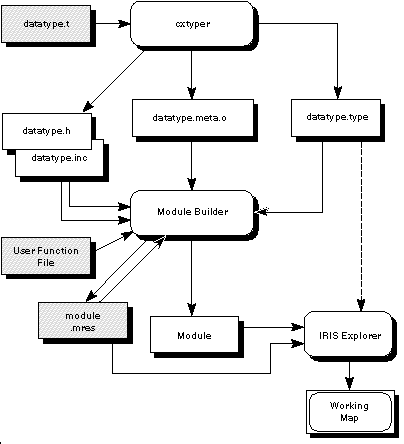
When you build a type, IRIS Explorer translates the
language in the type declaration file into C and creates the
.type
file. It also creates a header file for the data type (.h) and
an include file (.inc). You must include one of these files in
the (C or Fortan) user function file when you write a module
that makes use of the new type. To be more specific, suppose that you have created the data structure
for a data type called gnBase by using the principles described
in "Using the ETL", above. The data structure
has been saved in a file called gnBase.t. Building and installing
the type creates a number of files under $EXPLORERUSERHOME. The
files have these uses: Figure
8-1
shows the sequence of events in the build process.
Data types are present in many guises within IRIS Explorer. You can
use the Module Builder to create a series of modules that use the new data
type, then wire the modules into a map in the Map Editor and look at the
results. You will be able to see the various manifestations of the data
type declarations. The data types are visible to users at several places in the GUI (graphical
user interface). In the Map Editor, the user sees the data type on each
module port when a map is wired. The Map Editor uses the data types and
auxiliary constraint information to determine which ports are valid for
a given wiring, hence the IO pad highlighting to illuminate potential wiring
destinations. In the Module Builder, the module writer sees a menu of all available
port data types when creating input and output ports. Input and output
ports can be of any root data type. The Module Builder must configure these
menus at run time from the wiring connections made in the Connections panel.
Description strings appear as menu items in the Connections window.
Module communication across socket links, for example between modules
on different hosts or on a single host with non-shared memory, requires
that both the sender and receiver know how to transmit the data structure.
IRIS Explorer data structures may have variably sized portions, pointers
to shared pieces, and may even be recursive. Each module is compiled with
the necessary information about its constituent data types, so that it
can correctly transmit, read, and write those types. Furthermore, some
modules, such as For and While, must
be able to receive and send data structures that were not known when they
were built. Each data type is a structure made up of several members. The structure
members can be scalars of certain types, or compositions of scalars in
the form of arrays, unions, and structures. Associated with each member
is a set of accessor functions, the application programming interface (API),
that allows the user to set and get its value. The API is automatically
generated from the label given to each member, either by the user or internally
by the typing system. Table
8-4 gives an example of a member: IRIS Explorer suppresses spaces and other non-alphanumeric characters
such as parentheses, and runs the alphanumeric characters together to form
the base name of the API routine. It then adds the type prefix (which for
IRIS Explorer is cx). For the above example, the API routines
would have the base name shortNoOfItems*. A verb (either Get
or Set) that indicates the function of the API routine is then
appended; for example, to manipulate count, you can call shortNoOfItemsGet
and shortNoOfItemsSet. All members get the functions *Get and *Set, and some
members have additional routines. These are listed in the next section,
and you can refer to the generated header file for the API (.api.h)
for the function definition. Here is a list of the types of members and their functions. In this
example, the type is called myType, the
label is Label, and a trailing name indicates the form of access.
All members of a data type get these routines: The reference-counted structures get these routines: Note: cxDataRefDec() is used to delete all reference-counted
structures. The arrays get these routines: These include arrays inside datatypes such as lattice->data->dims,
the dimensions array within the cxData structure of cxLattice. In some cases, several members within a switch
construct may be given the same label. The members must lie within a discriminated
union (a switch) and no two members can lie in the same case of the union.
In this case, the several members take on a single identity, with the active
member depending on which case of the union is active. These labelled unions have additional accessor functions: C and Fortran versions of the routines are generated and loaded into
the library files libmyType.a. All IRIS Explorer user-defined type structures are placed in shared
memory on machines with shared memory. When you use the <TYPE><LABEL>Set()
routines, they free up the memory at the location they are about to overwrite
if the member is an array. If the member being overwritten is a reference-counted
item, the reference count is decremented. Fortran wrappers are generated for almost all user-defined type API
routines. They follow the usual rules for the IRIS Explorer Fortran API:
Incorrect wrappers are generated for routines returning a
char**
return value. For example, the prototype in the
myType.api.h
file for the routine named
You can suppress generation of these routines by following these steps.
Automatic Fortran wrapper generation will be suppressed for that routine. If this
routine is required, it can be created by hand.
Note: At the moment, there are problems with the Fortran
interface for functions that set strings (variables of type char*) within
a datatype, due to the vagaries of passing strings from Fortran to C. The manual pages for the API, also automatically generated, will be
installed in
$EXPLORERUSERHOME/man/man3. For information on setting the value of
the environment variable
This directory is probably not searched by default by the
man
command, but you can add this directory to your search path by defining the
IRIS Explorer maps can be distributed across a heterogenous network
of computers. Care must be taken with maps that pass user-defined data
types between machines. The Module Control Wrapper (MCW) translates the
information from the data type into a contiguous stream of data and sends
it from one machine to the other. For the process to work, the other machine
must know how to reconstitute this data stream into a recognizable data
type. This means that the data type must be installed on the other system
as well. Here is an example of a user-defined type which is basically an IRIS
Explorer lattice with the addition of three new scalars (Minimum,
Maximum, and Empty). For each data variable, there is a description
label string. This is the data type definition. It is the ETL description of the user-defined
type "tstLattice" and resides in $EXPLORERHOME/src/MWGcode/UserTypes/types/tstLattice.t.
This code uses the user-defined data type, tstLattice. It takes
in an IRIS Explorer lattice and generates a tstLattice. Before you can
make this module you must have installed the user-defined data type tstLattice,
following the instructions given in "Building the
Type and Related Files". The easiest way to demonstrate this is to connect GenLat to the
input. You can extract some information from the new data type by building
the second test module, and connecting it to the first one. The code resides
in $EXPLORERHOME/src/MWGcode/UserTypes/C/generate.c
and $EXPLORERHOME/src/MWGcode/UserTypes/Fortran/generate.f.
Resources files may be found in the same directories. This module reads in a tstLattice user-defined type and prints
out some specific information from it. The code resides in $EXPLORERHOME/src/MWGcode/UserTypes/C/print.c.
A resources file may also be found in this directory. As the Fortran wrapper
to the C function tstDataDataLabelsGet is incorrect (this function
returns a char**), the equivalent Fortran example would require
a user-generated Fortran wrapper. The Fortran example program is therefore
not supplied. There are two more modules in the directory $EXPLORERHOME/src/MWGcode/UserTypes/C,
ReadtstLattice and WritetstLattice,
that allow the user to read and write ASCII or binary versions of the user-defined
type. The user function for these modules is a simple interface to the
two auto-generated routines tstLatticeWrite and tstLatticeRead.
mkdir ~/explorer/myType
cd ~/explorer/myType
cat > TYPES
gnBase
^D
cxmkmf
make all
make install
What the Type Files Do
Since the Fortran programmer must access the type through a set of subroutines
and functions, the enumerated constants are necessary as function parameters.
No structure information is included in the Fortran include file,
since IRIS Explorer structures are not accessed directly from Fortran.
In addition, the library contains an object file gnBase.meta.o,
which contains a C structure describing the type. This "meta-type"
description is required by the type accessor library and fully describes
the type: it is a compiled object representation of the gnBase.t
file.

Figure 8-1 IRIS Explorer Types Information Flow
Visibility of Data Types in IRIS Explorer
In the GUI
Between Modules
Application Programming Interface
Type
Variable Name
Label
short
count
"No. Of Items"
API Member Types and Functions
Functions for All Members
Functions for Reference-counted Structures
Functions for Arrays
Dimensioning Arrays
Functions for Members in a Switch
Memory Handling
Fortran Wrappers
Suppressing char** Routines
char **myTypeItemGet( myType* src, cxErrorCode *ec );
echo "CXC2FPREPROC = c2fpreproc.sed" > Imakefile.default
cp $(EXPLORERHOME)/lib/c2fpreproc.sed c2fpreproc.sed
s/.*myTypeItemGet.*$//g
Location of API man Pages
setenv MANPATH (${MANPATH}:$EXPLORERUSERHOME/man)
Crossing Machine Boundaries
Example of a User-defined Type
#include <cx/DataCtlr.h>
#include <cx/Typedefs.t>
#include <cx/cxLattice.t>
shared root typedef struct {
long nDim "Num Dimensions";
long dims[nDim] "Dimensions Array";
tstData(nDim, dims) data "Data Structure";
cxCoord(nDim, dims) coord "Coord Structure";
} tstLattice;
shared typedef struct { /* IRIS Explorer Lattice's Data array */
long nDim;
long dims[nDim];
float minimum "Minimum";
float maximum "Maximum";
float empty "Empty";
long nDataVar "Num Data Variables";
string labels[nDataVar] "Data Labels";
cxPrimType primType "Primitive Data Type";
switch (primType) {
case cx_prim_byte:
char values[nDataVar, dims] "Data Array";
case cx_prim_short:
short values[nDataVar, dims] "Data Array";
case cx_prim_long:
long values[nDataVar, dims] "Data Array";
case cx_prim_float:
float values[nDataVar, dims] "Data Array";
case cx_prim_double:
double values[nDataVar, dims] "Data Array";
} d;
} tstData(nDim, dims);
The GentstLattice module
C Version:
/* This test module inputs a cxLattice and outputs a tstLattice.
* The differences are that the tstLattice has additional fields in the
* tstData (equivalent to cxData) structure for minimum, maximum,
* empty_cell_value, and labels for each data variable.
* This can be seen as a super-lattice.
*/
#include <cx/DataAccess.h>
#include <cx/DataTypes.h>
#include <cx/DataOps.h>
#include <cx/tstLattice.api.h>
#define CLEAN(A,B,C) if(memclean((void *)A,B,C)) return
int memclean(void *ptr, cxErrorCode ier, tstLattice *lat)
{
if((ptr == NULL) || (ier != cx_err_none))
{
cxDataRefDec(lat);
return 1;
}
else
return 0;
}
void generate(cxLattice *inLat, tstLattice **outLat)
{
char **labels;
cxCoord *coord;
cxCoordType coordType;
cxData *data;
cxErrorCode err;
cxPrimType primType;
int i, num_bytes;
long nDim,*dims,hasData,nDataVar,hasCoord,nCoordVar;
tstData *tdata;
void *inDataArray, *outDataArray;
/* Get the lattice description for the incoming lattice */
cxLatDescGet(inLat,&nDim,&dims,&hasData,&nDataVar,&primTyp
&hasCoord,&nCoordVar,&coordType);
/* Make the complete tstLattice structure and all its components
* using the incoming lattice characteristics
* Return if any of the allocations fail
*/
*outLat = tstLatticeAlloc(nDim,dims);
if(*outLat == NULL)
return;
tdata = tstDataAlloc(nDim,dims,nDataVar,primType);
CLEAN(tdata,0,*outLat);
tstLatticeDataStructureSet(*outLat,tdata,&err);
CLEAN(tdata,err,*outLat);
outDataArray = tstDataDataArrayAlloc(tdata);
CLEAN(outDataArray,0,*outLat);
tstDataDataArraySet(tdata,&outDataArray,&err);
CLEAN(tdata,err,*outLat);
cxLatPtrGet(inLat,&data,&inDataArray,&coord,NULL);
tstLatticeCoordStructureSet(*outLat,coord,&err);
CLEAN(tdata,err,*outLat);
/* Additional characteristics for the new tstLattice
* limit the data range that is accepted by the lattice
*/
tstDataMinimumSet(tdata,0.0,&err);
CLEAN(tdata,err,*outLat);
tstDataMaximumSet(tdata,1.0,&err);
CLEAN(tdata,err,*outLat);
tstDataEmptySet(tdata,-999.,&err);
CLEAN(tdata,err,*outLat);
/* Get the pointer to the labels structure and
* define the labels (they are the main difference between the
* new tstLattice type and cxLattice)
*/
labels = tstDataDataLabelsGet(tdata, &err);
CLEAN(tdata,err,*outLat);
for(i=0;i<nDataVar;i++)
{
labels[i] = cxDataMalloc(sizeof("label 99")+1);
CLEAN(labels[i],err,*outLat);
sprintf(labels[i],"label %d",i);
}
/* Copy the rest of the incoming lattice to the outgoing tstLattice */
num_bytes = cxDataPrimSize(data);
num_bytes *= cxDimsProd(nDim,dims,nDataVar);
bcopy(inDataArray,outDataArray,num_bytes);
}
Fortran Version:
SUBROUTINE GENER(INLAT,OUTLAT)
C
C fortran example for UDT's
C
INCLUDE '/usr/explorer/include/cx/DataAccess.inc'
INCLUDE '/usr/explorer/include/cx/DataOps.inc'
INCLUDE '/usr/explorer/include/cx/tstLattice.api.inc'
C
C .. Parameters ..
REAL ZERO, ONE, EMPTY
PARAMETER (ZERO=0.0,ONE=1.0,EMPTY=-999.0)
INTEGER LSIZE, MAXCHR
PARAMETER (LSIZE=4,MAXCHR=10)
C .. Scalar Arguments ..
INTEGER INLAT, OUTLAT
C .. Local Scalars ..
INTEGER COORD, CTYPE, DATA, ERR, HASCRD, HASDAT, I, IER,
* NBYTES, NCVAR, NDIM, NDVAR, P0, PTYPE, TDATA
C .. Local Arrays ..
INTEGER DIMS(1)
CHARACTER INARR(1), OUTARR(1)
CHARACTER*(MAXCHR) LABELS(1)
C .. External Functions ..
INTEGER MEMCLN
EXTERNAL CXDATAMALLOC, CXDATAPRIMSIZE, CXDIMSPROD, MEMCLN,
* TSTDATAALLOC, TSTDATADATAARRAYALLOC,
* TSTDATADATALABELSGET, TSTLATTICEALLOC
C .. External Subroutines ..
EXTERNAL CXLATDESCGET, CXLATPTRGET, TSTDATADATAARRAYSET,
* TSTDATAEMPTYSET, TSTDATAMAXIMUMSET,
* TSTDATAMINIMUMSET, TSTLATTICECOORDSTRUCTURESET,
* TSTLATTICEDATASTRUCTURESET
C .. Pointers to Lattice Structures ..
POINTER (PDIMS,DIMS)
POINTER (PIN, INARR)
POINTER (POUT, OUTARR)
POINTER (PLAB, LABELS)
C .. Executable Statements ..
C
C Get the lattice description for the incoming lattice
C
IER = CXLATDESCGET(INLAT,NDIM,PDIMS,HASDAT,NDVAR,PTYPE,HASCRD,
* NCVAR,CTYPE)
C
C Make the complete tstLattice structure and all its components
C using the incoming lattice characteristics
C Return if any of the allocations fail
C
OUTLAT = TSTLATTICEALLOC(NDIM,DIMS)
IF (OUTLAT.EQ.0) RETURN
TDATA = TSTDATAALLOC(NDIM,DIMS,NDVAR,PTYPE)
IF (MEMCLN(TDATA,0,OUTLAT).GT.0) RETURN
CALL TSTLATTICEDATASTRUCTURESET(OUTLAT,TDATA,ERR)
IF (MEMCLN(TDATA,ERR,OUTLAT).GT.0) RETURN
POUT = TSTDATADATAARRAYALLOC(TDATA)
IF (MEMCLN(POUT,0,OUTLAT).GT.0) RETURN
CALL TSTDATADATAARRAYSET(TDATA,POUT,ERR)
IF (MEMCLN(TDATA,ERR,OUTLAT).GT.0) RETURN
P0 = 0
IER = CXLATPTRGET(INLAT,DATA,PIN,COORD,P0)
CALL TSTLATTICECOORDSTRUCTURESET(OUTLAT,COORD,ERR)
IF (MEMCLN(TDATA,ERR,OUTLAT).GT.0) RETURN
CALL TSTDATAMINIMUMSET(TDATA,ZERO,ERR)
IF (MEMCLN(TDATA,ERR,OUTLAT).GT.0) RETURN
CALL TSTDATAMAXIMUMSET(TDATA,ONE,ERR)
IF (MEMCLN(TDATA,ERR,OUTLAT).GT.0) RETURN
CALL TSTDATAEMPTYSET(TDATA,EMPTY,ERR)
IF (MEMCLN(TDATA,ERR,OUTLAT).GT.0) RETURN
C
C We cannot use the Fortran API function TSTDATADATALABELSGET
C So will allocate our own array and replace it in the structure
C Free the LABELS array, after it has been copied into TDATA
C
PLAB = CXDATACALLOC(NDVAR,MAXCHR)
IF (MEMCLN(PLAB,ERR,OUTLAT).GT.0) RETURN
DO 20 I = 1, NDVAR
WRITE (LABELS(I),FMT='(''Label '',I2)') I-1
20 CONTINUE
CALL TSTDATADATALABELSSET(TDATA,LABELS,ERR)
IF (MEMCLN(TDATA,ERR,OUTLAT).GT.0) RETURN
CALL CXDATAFREE(PLAB)
C
C Copy the rest of the lattice into the tstLattice
C
NBYTES = CXDATAPRIMSIZE(DATA)*CXDIMSPROD(NDIM,DIMS,NDVAR)
DO 40 I = 1, NBYTES
OUTARR(I) = INARR(I)
40 CONTINUE
C
RETURN
END
INTEGER FUNCTION MEMCLN(PTR,ERCODE,TSTLAT)
C
C cleanup routine
C
C .. Scalar Arguments ..
INTEGER ERCODE, PTR, TSTLAT
C .. External Subroutines ..
EXTERNAL CXDATAREFDEC
C .. Executable Statements ..
C
IF ((PTR.EQ.0) .OR. (ERCODE.NE.0)) THEN
CALL CXDATAREFDEC(TSTLAT)
MEMCLN = 1
ELSE
MEMCLN = 0
END IF
RETURN
END
The PrinttstLattice module
#include <cx/DataAccess.h>
#include <cx/DataTypes.h>
#include <cx/tstLattice.api.h>
void prt( tstLattice *inlat )
{
char **f;
tstData *outData;
long i, nDV;
float mt;
cxErrorCode err;
outData = tstLatticeDataStructureGet(inlat,&err);
f = tstDataDataLabelsGet(outData,&err);
nDV = tstDataNumDataVariablesGet(outData,&err);
for(i=0;i<nDV;i++)
{
printf("label %d = %s\n",i,f[i]);
}
mt = tstDataEmptyGet(outData,&err);
printf(" Empty value = %f\n",mt);
}
Reading and Writing the User-defined Type
Last modified: Thu Jun 5 11:19:24 1997
[ Documentation Home ]