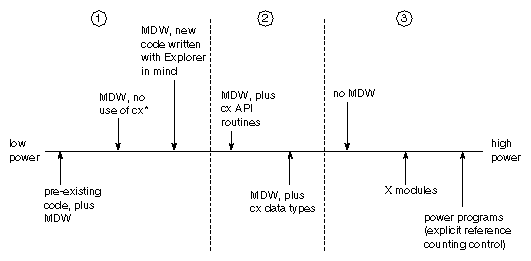
Figure 9-1 Spectrum of Module Complexity
This chapter discusses some advanced aspects of module writing. It covers some of the more esoteric functions of the IRIS Explorer product, which you may be interested in if you are writing complex and powerful modules that push the capabilities of IRIS Explorer beyond everyday levels. Some of the topics describe advanced techniques, such as writing hook functions, and some are more explanatory, such as the section on the firing algorithm. An in-depth knowledge of how IRIS Explorer operates allows you to make the most of the benefits that IRIS Explorer offers.
You need not read this chapter unless you are interested in learning more about IRIS Explorer or in implementing these techniques.
IRIS Explorer provides the module writer with many opportunities to make a choice between letting IRIS Explorer control a particular process in the module, or taking charge and running that process directly from the user function. As a result, you can write modules that operate at varying levels of independence from IRIS Explorer. Where the module writer settles on the continuum from total control to very little depends on current needs and programming expertise.
The major divide is between modules with a Module Data Wrapper (MDW) and those without. If you build a module without an MDW, you must make sure that your user function performs all the actions that the MDW would otherwise have done.
Figure
9-1
shows the range of module complexity. The modules in division 1 contain code
that works anywhere, and is reusable in other programs and systems. Division
2 modules contain code, possibly written for other purposes, that can be made
to work exclusively in IRIS Explorer without a lot of hard work, by adding
IRIS Explorer uses three controlling interfaces or "wrappers" to mediate between the module's user function and the rest of the system. They are the Module Control Wrapper (MCW), the Module Data Wrapper (MDW), and the Generic Wrapper. The relationship between wrappers and user or computational function is shown in Figure 9-2.
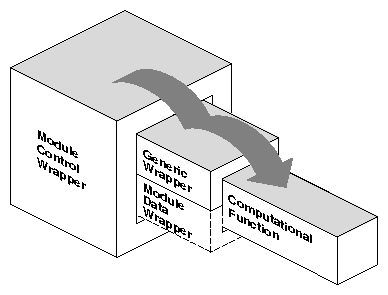
Every module has a Module Control Wrapper (MCW), which is the module data
manager. The MCW contains the firing algorithm and provides interfaces to
input and output functions, including port and widget settings. The MCW also
manages all communication with other modules.
The firing algorithm is described in
Appendix
B, "The Firing Algorithm". Information about the MCW's interface
capacity is contained in the API routines for all the input and output
functions.
The Module Builder constructs two kinds of MCWs, the default and a special
form for X modules. The X-MCW uses the X mechanism for handling scheduling.
The Module Data Wrapper (MDW) performs conversions between IRIS Explorer
and user-defined data types on the ports and the data format required by the
user function. You can thus develop modules with customized interfaces
without having to interact with the IRIS Explorer data types. Since you can
create IRIS Explorer modules from existing code, it is easy to fold a
function into a module without writing a line of source code yourself.
Similarly, it is possible to convert a library of routines into a library of
modules with minimal effort.
The connection between the data type and the subroutine is mediated by the
Module Data Wrapper (MDW), which translates input data into a form the user
function can process, and then translates the result into a suitable form for
output. The Module Builder generates an MDW for a module by default. However,
you can choose not to have an MDW, in which case you must explicitly
incorporate the MDW functions in your user function. These include:
The Generic Wrapper is not accessible by the module writer, except
indirectly through the Hook Functions menu. It contains:
In general, when you build a module, the Module Builder writes code for
the Module Data Wrapper and generates a linkage to a default Module Control
Wrapper (MCW), or an X Window System MCW if so selected. You make these
choices using the Build Options window.
To display the Build Options window, select
Options
from the Build menu on the Module Builder window. The Build Options window
offers you options for expanding individual control over the interface
between the user function and IRIS Explorer.
If you stipulate no automatically generated MDW, you must construct the
interface between the user function and the input and output ports yourself.
To build a module that has no Module Data Wrapper, follow these steps.
You must define the user function name in the Function Arguments window,
but you can skip the function definitions and the Connections window; the
information in these panes is used to generate the MDW.
The user function must create the access to input and output ports using
API subroutines, such as:
For details on these subroutines, see the
IRIS Explorer Reference Pages
or the on-line
man
pages.
When you build a module, you can choose whether to generate a default
Module Control Wrapper or an X Window System MCW. You will require an X-MCW
only if you have a DrawingArea widget, or otherwise need access to the X
server.
The X-MCW provides IRIS Explorer with the ability to recognize and
manipulate X Window widgets in a module. You can use a drawing area in a
module as an X input window, to hold an X Window or Motif widget, or as a
general X graphics drawing area. IRIS Explorer modules that contain X Window
drawing areas and use an X-MCW include
GenerateColormap
and
Histogram.
The code examples in
"Examples Using X Widgets"
later in this Chapter illustrate how to incorporate some of these X widgets
into an IRIS Explorer module.
These are the advantages of using the X Window System for customized
graphics:
IRIS Explorer provides some API subroutines to help you handle X Window
System widgets efficiently. They are described in the
IRIS Explorer Reference
Pages
and the on-line
man
pages and summarized in
Table
9-1.
This example shows how an X drawing area can be used as an input
mechanism. It places a Motif button in an X drawing area and reports whenever
the button is pressed. The code is in
$EXPLORERHOME/src/MWGcode/Advanced/C/XDrawInput.c.
The resources file
XDrawInput.mres
may be found in the same directory.
Note: It is not possible to write this module in Fortran.
This example uses a GLXWidget to create a drawing area. The code is in
$EXPLORERHOME/src/MWGcode/Advanced/C/GLXWidget.c.
The module resource file may also be found in this directory.
Note that to create a module that calls OpenGL directly it is necessary to
have a linkable version of the OpenGL libraries for your platform.
Note: There is no Fortran version of this module.
You can save a significant amount of disk space by combining several
related modules into a single executable image. This means you have only one
executable file for all the related modules. If these modules were combined
into one in the GUI, you could end up with a very complicated module control
panel. To avoid this, IRIS Explorer allows each module sharing a single
executable to have its own control panel. Each control panel is defined in a
separate module resources file with the same name as the module itself.
This section describes how to create a single executable, or combination
module, in the Module Builder and suggests what part of the library API to
call from the combined module code.
A combination module determines its actions in two ways. It can:
Both
AddImg
and
XorImg
have module resource files that describe their control panels and ports. In
addition, on the Build Options menu,
AddImg
has
Alternate Executable
selected, with the name
XorImg
displayed in the executable name field. The
XorImg
module does not have
Alternate Executable
selected, so its name field is identical to the module name. it is clear that
both
AddImg
and
XorImg
share the
XorImg
executable.
When the modules are built, the
XorImg Makefile
rules cause the
XorImg
executable to be compiled, linked, and installed along with
XorImg.mres. The rules for
AddImg
cause only its module resources file to be installed, thus referring to the
XorImg
binary. When either module is started, the same executable is run. Enough
information is provided to the
XorImg
binary that it can determined whether it was invoked as
AddImg
or
XorImg, and, consequently, which set of functionality to provide.
The
XorImg
user function includes a call to the API routine
The DataScribe modules provide another example of the use of alternate
executables. Each customized DataScribe module is simply a module resource
file that expects an input script and knows which set of ports to query,
based on the contents of the script. Every DataScribe module refers to the
generic DataScribe module for its executable. The DataScribe module uses the
input script, not
An ordinary module, called
MyModule
for example, can use an executable name derived from its
mres
file,
MyMod.mres. But some modules, notably the ImageVision
Library(tm)
modules, refer to a different executable. Since many modules can refer to a
single executable, those modules need not build the executable; some other
similarly named module does that. For example,
XorImg
is the module that builds the executable
XorImg; all the other ImageVision Library modules refer to it.
The
Alternate Executable
item in the Build Options window of the Module Builder lets you:
There is no difference in programming between the user code of a loop
controller and that of an ordinary module. The loop control work is handled
in the MCW. There are certain API routines, discussed below, that simplify
writing loop controller modules.
However, there are some capabilities a loop controller should have. The
module must have at least one input and at least one output port. It needs to
know that the loop continues by default if new data is sent into the loop,
and the loop stops if no new data enters the loop. If the module is to
continue or terminate a loop, it must be able to evaluate the condition for
the loop. The module should also be able to break its loop, to prevent the
loop from iterating indefinitely.
Note: A module that flushes multiple data sets, such as
Streakline, should not be given loop controller
status. Multiple data flushes from a controller module can lead to an
exponential increase in loop data that will paralyze your system.
There are four API subroutines you can use when writing a loop controller
module:
The
Data is put on the synchronisation port
Loop Ended
by the MCW when the iteration of a loop is terminated. You can prevent data
being put on this port, as well as the
Firing Done
port, by calling
You may also terminate a loop by sending out a sync frame, which is a
frame with no new data, on the looping outputs. You must take care here, as
the Map Editor user might wire a loop on ports you did not expect to be used,
causing the module not to terminate the loop. If the synchronisation port
Firing Done
is wired into the loop, as data is always put on this port when the module
fires successfully, then the only way to terminate the loop is by calling
The
While
and
Repeat
loop controller modules simply examine the condition for the loop, which is a
parameter value, and copy a pointer over from the input to the output port.
These are "typeless" modules which have
You can copy the
modulename.mres
file of these modules from directory
$EXPLORERHOME/modules
and modify each one slightly to create loop controllers that pass additional
data sets through, or accept particular data types. Just rename the module
and augment the port list. Under the Build Options menu, set the alternate
executable to be the name of the module you copied, e.g.
While, (see
"Using the Build Menu")
and run mbuilder on the new module.
While
module has the ports listed in
Table
9-2:
Substitute your own name for the "Value N" part of the port name. The
module must match initial/final and loop in/loop out values. It can do this
by finding the keywords "Initial", "Final", "LoopIn" and "LoopOut" on the
port names.
The For loop is a specific case of the While loop, and the
For
module is designed to obviate the need for parameter functions. The
For
module has sliders for changing initial, final and current parameter values
and parameter logic, and it also has a
Refire
button. The module evaluates a current value and waits for the return value.
The loop index uses double precision floating point values. The current value
is put out even when the loop terminates, so that other downstream modules
can query it.
The
cxGeneric
data type is found on input and output ports in the generic loop controller
modules, which are
For,
While,
Repeat
and
Trigger. You can wire any port types into or out of
a
cxGeneric
port.
The purpose of
cxGeneric
is to allow passage of all data types through a module. It is actually more
of an encapsulation system than a true type, since it does not operate on the
data at all.
When you install an interpreter module, you can list any extra files you
want installed with the module in the Module Builder. The Build Options
window has a text slot for listing them (see
Figure
2-17). Any module can cause extra files to be sent to
$EXPLORERUSERHOME/modules
when a
make install
command is issued.
The Module Builder will check for information pertaining to interpreter
modules, that is, those with an alternate executable name. Such a module may
have a file
$EXPLORERHOME/lib/modulename.interp
which lists the interpreter module, optional file suffix to use, and widget
normally containing the name of the interpreter script file.
Table
9-3
lists three examples:
These are the rules that the Module Builder follows during installation.
Hook functions allow you to gain control of a module when specific events
occur in the Module Control Wrapper (MCW). The MCW passes control to the hook
function whenever these events occur. A hook function can be linked to any
one of the following events in an IRIS Explorer session. These events are:
Once you have control through the hook function, you can call a subroutine
to carry out an activity related to the main user function. For example, the
Render
module has an initialization hook function that is triggered when the module
is launched in the Map Editor. This function initializes the Open Inventor
Library and the OpenGL drawing area, among other things. When the subroutine
has completed its task, control is returned to the MCW.
A hook function table is contained in the Generic Wrapper (GW) of every
module. The table is empty by default. To fill in the default table with your
own hook functions, you must:
Hook functions written in C++ must have a C linkage. You can do this by
declaring the function:
There are two forms of the calling sequence, one used in the
initialization and removal hook functions, and one used in the connection and
disconnection hook functions.
For the latter, the MCW passes the name of the affected port
(portName) and an integer that identifies that particular connection
(linkID). The
linkID
values are unique with respect to a given port and increase throughout a
single IRIS Explorer session.
The calling sequence of each type of hook function is given below. You can
give a hook function or subroutine any name you like; these are merely
examples.
Creating a module:
The MCW calls this function when the module is created, before connections
are made and parameters are delivered. Parameter values, particularly drawing
area window IDs, are meaningless at this time.
Connecting input ports:
The MCW calls this function after the user has connected input
portName
to some output.
Hook functions are ordinary procedures, which you must write before the
MCW can use them. The hook functions and user function must both have either
C or Fortran linkage; mixing linkages is not permitted.
The easiest way to generate hook function prototypes is to define them in
the Module Builder as follows:
It also creates hook function prototypes in the correct language and
places them in the prototype user function file created when you select
User Function
from the Prototypes menu. You need merely fill in the computation.
Then create the function prototype in the Module Builder (see
"Hook Function Prototypes").
Here are some points to note when you are writing a hook function.
Note: If you have old modules that define
cxHookTable, you must remove this definition from your source code. If
you do not, you will see a multiply-defined symbol. This may make debugging
more difficult, and on machines such as the Sun, the module will not
build.
The following example shows the use of hook functions to allocate storage
space at module initialization, to get information about port connections,
and to delete persistent lattice data in shared memory when the module is
destroyed. Code and resources files may be found in the directories
$EXPLORERHOME/src/MWGcode/Advanced/C
and
$EXPLORERHOME/src/MWGcode/Advanced/Fortran.
IRIS Explorer transfers data between modules using shared memory if the
modules are on the same machine and the machine supports shared memory. The
advantage of using shared memory is that large quantities of data can be
transferred from one module to another with very little communication
overhead. All modules access the shared memory arena simultaneously, so only
the address of the data has to be transferred, not the data itself. However,
the data must be managed somehow, and this is done by means of
reference counting.
The reference count can be thought of as the number of places that wish to
keep a persistent copy of specific data. These places are also responsible
for decrementing the count when they have finished with the data.
All modules are responsible for collectively managing the data in shared
memory. One module creates data and sends it to other modules. When all the
modules are finished with that data, the space it occupies must be reclaimed.
IRIS Explorer uses reference counting to manage this process. With reference
counting, a module does not need to know anything about which other modules
use the data. It must simply perform certain bookkeeping actions on the data
it references, so that the system knows when the data should be reclaimed.
Reference counting is essential when using shared memory, but the
mechanism is also general enough to be used by a single process on private
data. Thus, modules executing on a machine that does not support shared
memory can still use the same code for managing data memory.
As long as every module does its bookkeeping correctly and consistently,
there will be no memory leaks, and data will not be reclaimed while a module
still refers to it.
Caution: The automatically generated Module Data Wrapper cannot
completely recover if the shared memory arena becomes full. It is possible
that, if there is not enough memory for the computational function or for the
MDW itself, the MDW may leak memory.
An integer is kept with each data object, to record the number of places
where the data is used. When a module receives data, it increments the
integer count to show that the data is being used in an additional place.
When the module is finished with the data, it decrements the reference count.
When the count becomes zero, the data is no longer needed and that module
deletes the data.
For example, the module's input and output ports store data for the
module, so they must manipulate the reference count. When the module puts
data on the output port, the output port decrements the count of the old data
on the port and increments the count of the new data. The output port retains
use of the data so it can be sent to modules as they are connected to the
port.
When a module receives new data, the input port decrements the count on
the old data on that port and increments the count on the new data. The input
port retains use of the data until it is replaced, which means the data is
available every time the module fires, even if the data has not changed.
The API subroutines
IRIS Explorer implements a less rigid version of reference counting than
that defined above. Data objects are created with a reference count of 0
because nothing has claimed responsibility for decrementing the count. If the
count on such an object is decremented immediately, it becomes -1. The object
is deleted and no error is reported.
The default count of 0 simplifies coding of the user function cases. A
data object is created and (usually) placed on the output port. The output
port increments the count and assumes responsibility for maintaining the
count, thus freeing the user function from that responsibility and allowing
it to ignore the data. If data objects were always created with a reference
count of 1, then you would have to decrement the count of each object after
placing it in the output port.
A user function may want to allocate a data object for temporary storage
so that the same data can be output more than once. In this case, the user
function does need to increment the count, ensuring that the data will
persist as long as the user function needs it. When it is no longer required,
the user function should decrement the count.
A module may have more than one reference to any data, so the value of the
reference count may be greater than the number of modules using it. It is
easier to code a module when you can allow it to have multiple references to
the data, because the user function does not have to maintain exactly one
reference count.
All IRIS Explorer system and user-defined data types are
reference-counted. Data objects may contain references to other
reference-counted objects. For example, the
cxLattice
and
cxPyramid
data types contain references to
cxData,
cxCoord,
cxConnection, and
cxLattice
objects. The reference-counting scheme handles arbitrary sharing of IRIS
Explorer data objects within other objects, just as data objects are shared
between modules. For example, a
cxData
object can be contained in more than one
cxLattice.
Likewise, a
cxLattice
object can be contained in more than one
cxPyramid
and referenced by more than one module.
The IRIS Explorer routines that set the contents of
cxLattice
and
cxPyramid, for example,
The automatically generated interface routines
The
cxGeometry
data type contains references to the field data of the IRIS Explorer nodes
within an Open Inventor scene graph. This reference counting is managed
within the geometry API and the IRIS Explorer node classes and you will
never need to manipulate these directly. Note that this is in addition to the
Open Inventor reference counting for nodes and referencing and deleting nodes
should be programmed as usual for an Open Inventor scene graph, when using
Open Inventor directly instead of the geometry API. It is important to ensure
that a scene graph is correctly deleted when a module exits, lest it leak the
shared memory in its nodes. .
Module writers rarely have to manipulate reference counts, but there are
times when it is necessary. This happens most commonly when the module needs
to retain data that the system would normally have released. For example, a
module that outputs a moving average of the last three lattices delivered to
it might need to keep the lattices from two previous firings. When a new
lattice arrives on a wire, it decrements the reference count on the lattice
that it replaces. This can result in the memory for the old lattice being
deallocated. To stop this happening, the module should increment the
reference count of the lattices it wants to save. This process applies to all
data types.
If a module increments the reference count to save data, it is very
important that it decrement the reference count to free the memory when the
data is no longer needed. Not properly balancing reference count increments
and decrements can result in memory leaks which degrade performance.
The shared memory arena is a fixed-size resource. It is at most 256 MB,
and may not reach that size. Because it is stored in a memory-mapped file,
its size is limited by the available disk space and the command line and
configuration options that are specified when the user starts IRIS Explorer;
therefore, it is possible for data memory allocation routines to fail, no
matter how large the arena might be, because the arena size may exceed the
amount of available memory.
It is very important to keep the limitations of memory allocation in mind
when you write modules. The memory requirements of the system fluctuate, so
many out-of-memory situations are transient. IRIS Explorer tries to allocate
memory several times over a short period before returning an error flag, at
which time an error message is sent to the Map Editor, which in turn
generates a pop-up dialog box.
Modules should check the data allocation flag after every IRIS Explorer
routine that allocates data memory. The
If a module ignores allocation errors, it may crash due to a bad pointer.
Even worse, it may cause another module to crash. This kind of module failure
can be very hard to diagnose. If a module crashes, it cannot decrement
reference counts to data to which it has references, so the data will be
leaked. This makes a bad situation even worse.
The IRIS Explorer modules provided with the system do not attempt memory
allocations after an error has been detected. They simply reclaim any memory
they have already allocated and return from the user function. Unfortunately,
the module may have successfully allocated several data objects, which it
must reclaim before returning. The recovery code can get quite complicated,
especially for a module that creates many data objects or creates
cxPyramid
or
cxGeometry
objects. It helps a great deal if all data is allocated in one place, where
it is easier to keep track of what should and should not be recovered. This
is not always possible, but grouping code in modules to streamline data
allocation helps to eliminate programming errors.
If the memory requirements are smaller when no modules are firing, the
Fire Now
option on the module pop-up menu will cause it to execute again. If the
module still does not have enough memory, you can free some data memory by
deleting modules that are consuming large portions of memory.
If a module runs out of memory, it can:
However, each failed attempt still generates the pop-up dialog box in the
Map Editor.
The following examples show how to recover from allocation errors for some
of the IRIS Explorer data types. They also illustrate some coding styles for
recovery.
Note: These examples are in C only because they are meant to
illustrate specific techniques, rather than provide reusable code. Templates
for these routines may be found in directory
$EXPLORERHOME/src/MWGcode/Advanced/C.
The first example allocates a
cxParameter
and two
cxLattices. It uses a single memory recovery routine,
The second example shows the use of recovery labels in the reverse order
of the data allocation. Execution falls through the labels, unwinding the
successful allocations.
The third example shows the memory for lattice data and coordinates
allocated separately. Recovery becomes more complicated in this case. Once
The fourth example shows a recovery strategy for the
cxPyramid
data type. It is similar to that required by
cxLattice.
The base lattice and the lattice/connection pair are managed similarly to
the data and coordinates for
cxLattice. Once successfully stored in the pyramid, they should
not
be decremented by the user function.
Also,
The
cxGeometry
data type complicates error recovery even more, since it contains a buffer of
transcribed geometry specification commands. Each geometry specification
routine adds commands to this buffer, which may cause the buffer to be
enlarged, so
In this example, the module performs operations if the error flag is not
set. It can then check the flag at key points and perform cleanup if
required.
The buffer may be expanded more than once for each geometry specification
command, so it may contain a partial command when the data allocation fails.
The partial command may confuse downstream modules so seriously that the
contents of the geometry must be thrown away.
Because the geometry interface is a
delta protocol
(only changes are sent), any
Note:
Several subroutines in the API allow you to increase the flexibility of
your module. You can:
The use of these routines is described briefly in the next three sections.
The subroutine
When you use
The related subroutine,
This module demonstrates the use of
Note: There is no equivalent Fortran version of this module.
You can use
The callback is made when the timer expires, but the user function must be
quiescent at the time. If the timer expires while the user function is
executing, the callback will not be made until it has completed execution,
and the timing schedule will be thrown off.
You can use
The code for this example is in
$EXPLORERHOME/src/MWGcode/Advanced/C/Timer.c
and
$EXPLORERHOME/src/MWGcode/Advanced/Fortran/Timer.f. Resources files
may be found in the same directories.
You can use
cxFilenameExpand
to expand the name of a file fully to include the directory path. You can
give it a string including, for example,
~
or
The code for the following example is in
$EXPLORERHOME/src/MWGcode/Advanced/C/FilenameExpand.c
and the resources file
FilenameExpand.mres
may be found in the same directory.
Note: There is no equivalent Fortran version for this module.
This section explains how to set up a user directory in which modules can
be made. It assumes some knowledge of UNIX program development, specifically,
the
make(1)
program. IRIS Explorer uses an extension to
make
called
Imake
which allows us to distribute a portable development mechanism. With
Imake, you do not directly create the
Makefile
files used by
make. Instead,
Makefile
files are generated automatically from a file named
Imakefile
(see
Appendix
A, "Using Makefiles"). IRIS Explorer takes this one step further.
Within the subdirectories where you develop modules, the Module Builder
creates the
Imakefile
for you from the information in the module resource file, and then it creates
a
Makefile
from that.
There are two paths to follow at this point:
Path 1 provides a good test of the installation of IRIS Explorer on your
machine and shows a working example of module compilation. Path 2 is more
direct, allowing you to begin module development immediately. In either case,
you must first set up a new, empty module build tree. Each method is
described in detail in the following sections.
The plan is to create a directory where you have write permission (for
example, beneath your home directory) and then develop modules in
subdirectories of that directory. One or more modules may be developed in
each subdirectory and you can build one or all of them with a single command.
First, reset the
Note: Individual users do not always have write access to
/usr/local/explorer
on a multi-user system. In this case, set
Decide where you want to do module development and create that directory.
~/explorer/modules
is a good choice.
If
~/explorer
does not already exist on your system, create it by typing:
From here, you can proceed through one or the other, or both, of the
following sections, depending on your purpose.
If you decide to build the sample IRIS Explorer modules provided in source
format, you can compile them in your own source directory. To do this, first
copy the sources into your directory:
This assumes that
explorer/modules
is a directory in your home directory where you will build these modules.
Next, make a
Makefile
in that directory:
Next, make sure that your EXPLORERUSERHOME environment variable is set to
a place where you want these modules installed, for example:
Now, create
Makefiles
for those module subdirectories:
Finally, you compile, link and install these modules:
At the end, all of the sample modules should be compiled, linked, and
installed.
If you decide to set up your own build system, you create subdirectories
in which you can develop one or more modules. First copy the template
Imakefile
into your development directory and make it writable:
Then you can make a subdirectory (whose name may or may not match the
module name you wish to use), and add that subdirectory to the list in
Imakefile
which starts with the line
and is followed by a list of subdirectories containing modules. Any number
of directory names can be listed, as long as they exist and are IRIS Explorer
module development subdirectories.
You then build a new top-level
Makefile, remake subdirectory
Makefiles, and then proceed with development of the new module.
For example,
There are several environment variables that affect the way modules are
built and installed. See
"Configuring the Build Environment"
for more information on these variables.
Each time you add a directory to the MODULESUBDIRS list, you must recreate
the top-level
Makefile
with
cxmkmf. Do not be tempted to edit the
Makefile
directly.
Once you have done this, the following commands will work in each module
subdirectory:
The typical development cycle is to write your module user function, use
the Module Builder to describe it, then use the Build option in the Module
Builder to build it. Alternatively, you can describe the module first, then
use the Module Builder to generate the function prototype. You can then fill
in the code for the user function, and after that, build the module.
From this point on, you can rebuild the module at any time using the
make all
command. For more information, refer to
Appendix
A, "Using Makefiles".
Module Data Wrapper
The Generic Wrapper
Working with Module Wrappers
Modules Without MDW
Using the X-MCW Option
These are the disadvantages:
Subroutine
Function
Creates a drawing area that can later be bound to a module control
panel
Attaches a widget hierarchy to a control panel drawing area
Updates the size of a widget hierarchy in the drawing area of a module
control panel
Registers a callback function for a
cxXtArea
Creates an OpenGL window inside a control panel drawing area
Registers a redraw procedure with a
cxXtGLArea
Example Using X Widgets
/*
 * This example shows how an X drawing area can be used
 * as an input mechanism.
 */

#include <X11/Intrinsic.h>
#include <X11/Xm/PushB.h>

#include <cx/XtArea.h>

void xcallback(Widget w, void *client)
{
     printf("button pressed\n");
}

void xwidget(long window)
{
     static int first = 1;
     static Widget top;

    Widget button;

    /*
     * Do initialization stuff
     */
    if (first) {
	first = 0;

	/*
	 * Get a Xt form and put a button on it
	 */
	top = cxXtAreaInitialize();
	button = XtVaCreateManagedWidget("button",
	    xmPushButtonWidgetClass, top,
	    XmNleftAttachment, XmATTACH_FORM,
	    XmNrightAttachment, XmATTACH_FORM,
	    XmNtopAttachment, XmATTACH_FORM,
	    XmNbottomAttachment, XmATTACH_FORM,
	    NULL);

	/*
	 * Add a callback then attach the form to the window
	 */
	XtAddCallback(button, XmNactivateCallback,
	    (XtCallbackProc) xcallback, (XtPointer) NULL);

	cxXtAreaAttach(top, window);
    }
    cxXtAreaResize(top, window);
}
Graphics Library (OpenGL) Example
/*
 * Example module using a GLXWidget
 */

#include <stdio.h>

/* X includes */
#include <X11/Intrinsic.h>
#include <Xm/Xm.h>

/* OpenGL Drawing Area Include */
#include <X11/GLw/GLwDrawA.h>

/* GL includes */
#include <GL/gl.h>
#include <GL/glx.h>

/* Explorer includes */
#include <cx/PortAccess.h>
#include <cx/DataAccess.h>
#include <cx/UserFuncs.h>
#include <cx/XtArea.h>

Widget top; /* top level form widget */
Widget da;  /* drawing area widget */

/*
 * Widget action routine
 */
void xaction(void *client, XEvent *ev)
{
        float p[2];     /* temporary storage for coordinates */
        short xsize, ysize;    /* size of GL widget */

        /* get size of OpenGL window */
        XtVaGetValues(top, XmNwidth, &xsize, NULL);
        XtVaGetValues(top, XmNheight, &ysize, NULL);
        switch (ev->type)
        {
        case ButtonPress:
        /*
         * IMPORTANT NOTE: X origin is *upper* left;
         * GL origin is *lower* left.
         */
                printf("button pressed at %d, % d\n",
                 ev->xbutton.x, ysize - 1 - ev->xbutton.y);
                break;

        case Expose:
      /*
       * some sample OpenGL stuff
       */

                glViewport(0, 0, (GLsizei)xsize, (GLsizei)ysize);

                glClearColor(0.0, 0.317, 0.439, 0.627);
                glClear(GL_COLOR_BUFFER_BIT);

                glMatrixMode(GL_PROJECTION);
                glLoadIdentity();
                gluPerspective(40.0, 1.0, 0.5, 5.0);
                glTranslatef(0.0, 0.0, -4.0);

                glColor4b(255, 255, 255, 255);

                glBegin(GL_LINE_LOOP);
                p[0] = 0.0;
                p[1] = 0.0;
                glVertex2fv(p);
                p[0] = 1.0;
                p[1] = 1.0;
                glVertex2fv(p);
                p[0] = 1.0;
                p[1] = -1.0;
                glVertex2fv(p);
                p[0] = -1.0;
                p[1] = -1.0;
                glVertex2fv(p);
                p[0] = -1.0;
                p[1] = 1.0;
                glVertex2fv(p);
                glEnd();

                glFlush();
                GLwDrawingAreaSwapBuffers(da);

      break;
    }
}

/*
 * Module initialization routine
 *
 * This routine must be listed as the "initialization" hook function
 */
void xex2_init()
{
        long wid;                     /* window id from UI */
        XtTranslations translations;  /* X translations structure */
        int     n;
        Arg     args[12];
        XVisualInfo *vi;
        static GLXContext glx_context;

        /* X actions record */
        static XtActionsRec actions[] ={"xaction",(XtActionProc) xaction};

        /* Initialize an Xt area, get an empty form widget */
        top = cxXtAreaInitialize();

        /* Get the UI drawing area widget id  */
        wid = cxParamLongGet((cxParameter *)
        cxInputDataGet(cxInputPortOpen("window")));

        /* Define some actions and translations for our widget */
        XtAddActions(actions, XtNumber(actions));
        translations = XtParseTranslationTable(
                "<BtnDown>: xaction()\n\
                 <Expose>: xaction()");

        /* Put a drawing area widget in the form */
        da = XtVaCreateManagedWidget("da",
                                glwDrawingAreaWidgetClass, top,
                                GLwNrgba, TRUE,
                                GLwNdoublebuffer, TRUE,
                                XmNtranslations, translations,
                                XmNleftAttachment, XmATTACH_FORM,
                                XmNtopAttachment, XmATTACH_FORM,
                                XmNrightAttachment, XmATTACH_FORM,
                                XmNbottomAttachment, XmATTACH_FORM,
                                NULL);

        /* Attach the form to the drawing area window  */
        cxXtAreaAttach(top, wid);

        /* initialise the OpenGL area */
        XtSetArg(args[0], GLwNvisualInfo, &vi);
        XtGetValues(da, args, 1);

        glx_context = glXCreateContext(XtDisplay(da), vi, 0, GL_FALSE);
        GLwDrawingAreaMakeCurrent (da, glx_context);
        glDrawBuffer(GL_FRONT_AND_BACK);
}


/*
 * Module execution function
 *
 */

long xex2()
{
        int windowPort;         /* port number of window parameter */
        long wid;               /* window id from UI */

        /* Get window port number and the widget ID of the drawing area */
        windowPort = cxInputPortOpen("window");
        wid = cxParamLongGet((cxParameter *)
                        cxInputDataGet(cxInputPortOpen("window")));

        /* Resize the form widget to the UI drawing area size */
        cxXtAreaResize(top, wid);

        return 0;
}
Sharing Module Executables
Types of Shared Executable
Using an Alternate Executable
In the case of a combined executable, each module has its own module
resources file, but only one of the modules creates and installs an
executable. The executable is then responsible for determining which
operation to invoke upon firing.
Building Loop Controller Modules
Using the Loop Controller API
Using Generic Controller Modules
Input Ports
Output Ports
Condition
Final Value 0
Initial Value 0
Final Value 1
...
...
LoopIn Value 0
LoopOut Value 0
LoopIn Value1
LoopOut Value1
The For Module
The cxGeneric Data Type
Installing Interpreter Modules
Interpreter Module
Module Executable
Suffix
Widget Name with embedded space
LatFunction.interp
LatFunction
.shp
Program File
GenericDS.interp
GenericDS
.scribe
Script File
MyInterp.interp
MyInterp
NULL
My Widget
Hook Functions
extern "C" my_hook_fcn( )
{ ...
}
Hook Function Calling Sequence
Writing Hook Functions
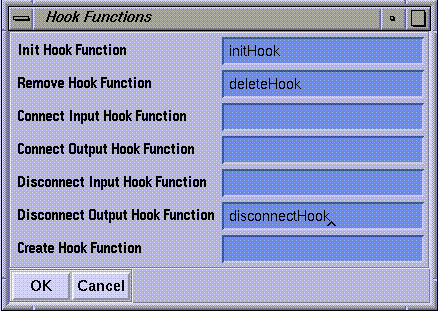
Figure 9-3 The Hook Function Window
Examples
C Version:
#include <cx/DataAccess.h>

cxLattice *permanentLattice = NULL;

/***********************************************************************
 * This module shows how hook functions may be used
 *
 * Each hook function generates output, so the calling of each may be
 * followed as the module starts up, is connected to other modules,
 * is fired, and gets deleted.
 ***********************************************************************
 */
void HookFuncModule(cxLattice *lat)
{
  /* You may complete the user function by adding lines of code here
   * This output will appear every time the modules is fired
   */
  printf("User function called.\n");

  /* A private copy of the input lattice is stored by the user
   * This storage would be leaked on module destruction, unless
   * we increment the reference counter for this storage, and
   * ensure to delete it in the hook destroy function
   */
  if (permanentLattice == NULL)
    {
      permanentLattice = cxLatDup(lat,1,1);
      cxDataRefInc(permanentLattice);
      printf("increase the reference count for the private lattice\n");
    }
}
#include <cx/DataOps.h>

int *myLinkArray = NULL;

/***********************************************************************
 * Initialisation hook function in C
 *
 * Some storage is allocated for use while the module exists
 ***********************************************************************
 */
void myInitFunc()
{
  /* You may complete the initialisation function by adding code here
   * for example to initialise the geometry library
   * This output will only appear when the module is started up
   */
  printf("Initialisation hook function called.\n");

  /* Initialise the link array */
  if (myLinkArray == NULL)
    myLinkArray = (int *) cxDataCalloc(100, sizeof(int));
}
/***********************************************************************
 * Connection hook function in C.
 *
 * This shows how one might save the port name associated with every
 * connection. Storage allocation of "myLinkArray" is done in the
 * initialisation hook function.
 */

void myConnectFunc(portName, linkID)
     char *portName;
     int linkID;
{
  extern int *myLinkArray;

  /* Save the association of port and linkID. The link tag may be
   * negative, indicating a widget connection or a parameter function
   * (pfunc) connection. If so, ignore it.
   */
  printf("linkID=%d\n", linkID);
  if (linkID >= 0 && linkID < 100)
    {
      myLinkArray[linkID] = portName;
      printf("link %d is named %s\n",linkID, myLinkArray[linkID]);
    }
}
#include <cx/DataAccess.h>

/***********************************************************************
 * Destroy hook function in C.
 *
 * This procedure shows how one might write a "desctruction" hook
 * function.  When the map editor user destroys a module, this
 *  procedure, if defined, will be called.
 *
 * Typically, this is useful if the module caches old data inputs.
 *  This provides a place to put the code that can decrement the
 * reference counts on the data.
 ***********************************************************************
 */
void myDestroyProc(void)
{
  extern cxLattice *permanentLattice;
  int i;

  /* Here, one might adjust the reference counts on any cached data
   * In this case, there is only one lattice
   */
  cxDataRefDec(permanentLattice);
  printf("User destroy hook function called.\n");
}
Fortran Version:
      SUBROUTINE HKFUNC(LAT)
C
      INCLUDE '/usr/explorer/include/cx/DataAccess.inc'
C
C     This module shows how hook functions may be used
C
C     Each hook function generates output, so the calling of each may be
C     followed as the module starts up, is connected to other modules,
C     is fired, and gets deleted.
C
C     .. Scalar Arguments ..
      INTEGER           LAT
C     .. Scalars in Common ..
      INTEGER           PRVLAT
C     .. Local Scalars ..
      INTEGER           FIRST
C     .. External Subroutines ..
      EXTERNAL          CXDATAREFINC
C     .. Common blocks ..
      COMMON            /CACHE/PRVLAT
C     .. Data statements ..
      DATA              FIRST/1/
C     .. Executable Statements ..
C
C     You may complete the user function by adding lines of code here
C     This output will appear every time the modules is fired
C
      PRINT *, 'User function called.'
C
C     A private copy of the input lattice is stored by the user
C     This storage would be leaked on module destruction, unless
C     we increment the reference counter for this storage, and
C     ensure to delete it in the hook destroy function
C
      IF (FIRST.EQ.1) THEN
         PRVLAT = CXLATDUP(LAT,1,1)
         CALL CXDATAREFINC(PRVLAT)
         PRINT *, 'increase the reference count for the private lattice'
         FIRST = 0
      END IF
C
      RETURN
      END
      SUBROUTINE MYINIF
C
C     Initialization hook function in Fortran
C
C     .. Arrays in Common ..
      LOGICAL          MLSTAT(100)
C     .. Local Scalars ..
      INTEGER          I
C     .. Common blocks ..
      COMMON           /CONN2/MLSTAT
C     .. Executable Statements ..
C
C     You may complete the initialisation function by adding code here
C     for example to initialise the geometry library
C     This output will only appear when the module is started up
C
      PRINT *, 'Initialisation hook function called.'
C
C     Initialise the link tags to .FALSE.
C
      DO 20 I = 1, 100
         MLSTAT(I) = .FALSE.
   20 CONTINUE
C
      RETURN
      END
      SUBROUTINE MYCONF(PRTNAM,LNKTAG)
C
C     This connect hook function shows how one might save the
C     port name associated with every connection.
C     The name is saved in a common variable.
C     The initialisation hook function sets array MLSTAT to .FALSE.
C
C     .. Scalar Arguments ..
      INTEGER           LNKTAG
      CHARACTER*(*)     PRTNAM
C     .. Arrays in Common ..
      LOGICAL           MLSTAT(100)
      CHARACTER*32      MLARAY(100)
C     .. Local Scalars ..
      INTEGER           I
C     .. Common blocks ..
      COMMON            /CONN1/MLARAY
      COMMON            /CONN2/MLSTAT
C     .. Executable Statements ..
C
C     The LNKTAG may be negative, indicating that the connection is
C     either a widget or a parameter function (pfunc) in which case
C     this code ignores it.
C
      IF (LNKTAG.GE.0 .AND. LNKTAG.LT.100) THEN
         MLARAY(LNKTAG+1) = PRTNAM
         MLSTAT(LNKTAG+1) = .TRUE.
      END IF
C
      DO 20 I = 1, 100
         IF (MLSTAT(I)) THEN
            PRINT *, 'Link number', I - 1, ' is named ', MLARAY(I)
         END IF
   20 CONTINUE
C
      RETURN
      END
      SUBROUTINE MYDSTF
C
C     Destroy hook function in Fortran.
C
C     This procedure shows how one might write a "desctruction" hook
C     function.  When the map editor user destroys a module, this
C     procedure, if defined, will be called.
C
C     Typically, this is useful if the module caches old data inputs.
C     This provides a place to put the code that can decrement the
C     reference counts on the data.
C
C     The name of this procedure must be entered into the hook function
C     table in the module builder.
C
C     .. Scalars in Common ..
      INTEGER          PRVLAT
C     .. External Subroutines ..
      EXTERNAL         CXDATAREFDEC
C     .. Common blocks ..
      COMMON           /CACHE/PRVLAT
C     .. Executable Statements ..
C
C     Here, one might adjust the reference counts on any cached data
C     In this case ther is only one lattice
C
      CALL CXDATAREFDEC(PRVLAT)
   20 CONTINUE
      PRINT *, 'User destroy hook function called.'
C
      RETURN
      END
Understanding Reference Counting
Managing Data in Shared Memory
How Reference Counting Works
How IRIS Explorer Implements Reference Counting
Reference-Counting Data Types
Reference Counts for Contained Data Types
Manipulating Reference Counts
Shared Memory Arena
Allocating Memory Efficiently
Recovering from Memory Errors
Examples of Memory Recovery
Example 1
#include <cx/DataAccess.h>
#include <cx/DataOps.h>

cxParameter	*parm = NULL;
cxLattice	*lat1 = NULL;
cxLattice	*lat2 = NULL;

void memCleanup()
{
  cxDataRefDec( parm );
  cxDataRefDec( lat1 );
  cxDataRefDec( lat2 );
}

void userFunction()
{
  parm = cxParamNew();
  if (cxDataAllocErrorGet())
    return;                  /* no cleanup required */
  lat1 = cxLatNew(...);
  if (cxDataAllocErrorGet())
    {
      memCleanup();
      return;
    }
  lat2 = cxLatNew(...);
  if (cxDataAllocErrorGet())
    {
      memCleanup();
      return;
    }
  /*
   * Et cetera...
   */
}
Example 2
#include <cx/DataAccess.h>
#include <cx/DataOps.h>

void        userFunction()
{
  cxParameter *parm = NULL;
  cxLattice *lat1 = NULL, *lat2 = NULL;

  parm = cxParamNew();
  if ( cxDataAllocErrorGet() )
    goto parm_Failed;
  lat1 = cxLatNew(...);
  if ( cxDataAllocErrorGet() )
    goto lat1_Failed;
  lat2 = cxLatNew(...);
  if ( cxDataAllocErrorGet() )
    goto lat2_Failed;

  /* ... */

  /* normal return */
  return;

 lat2_Failed:
  cxDataRefDec( lat1 );
 lat1_Failed:
  cxDataRefDec( parm );
 parm_Failed:
  return;
}
Example 3
#include <cx/DataAccess.h>
#include <cx/DataOps.h>

void userFunction()
{
  cxLattice *lat1, *lat2;
  cxData *data;
  cxCoord *coords;

  lat1 = cxLatRootNew(...);
  if( cxDataAllocErrorGet() ) return;
  data = cxDataNew(...);
  if( cxDataAllocErrorGet() )
    {
      cxDataRefDec( lat1 );
      return;
    }
  coords = cxCoordNew(...);
  if( cxDataAllocErrorGet() )
    {
      cxDataRefDec( lat1 );
      cxDataRefDec( data );
      return;
    }
  /* cxLatPtrSet doesn't allocate memory */
  cxLatPtrSet( lat1, data, NULL, coords, NULL );

  lat2 = cxLatNew(...);
  if( cxDataAllocErrorGet() )
    {
      cxDataRefDec( lat1 ); /* NOT data or coords */
      return;
    }
  /* Etcetera .. */

  /* normal return */
  return;
}
Example 4
#include <cx/DataAccess.h>
#include <cx/DataOps.h>

void userFunction()
{
  cxPyramid     *pyr;
  cxLattice    *base, *layer, *other;
  cxConnection    *conn;

  base = cxLatNew(...);
  if( cxDataAllocErrorGet() ) return;
  pyr = cxPyrNew(...);
  if( cxDataAllocErrorGet() )
    {
      cxDataRefDec( base );
      return;
    }
  cxPyrSet( pyr, base );        /* no allocation */

  layer = cxLatNew(...);
  if( cxDataAllocErrorGet() )
    {
      cxDataRefDec( pyr );       /* not base */
      return;
    }

  conn = cxConnNew(...);
  if( cxDataAllocErrorGet() )
    {
      cxDataRefDec( pyr );
      cxDataRefDec( layer );
      return;
    }

  cxPyrLayerSet( pyr, i, conn, layer );
  if( cxDataAllocErrorGet() )
    {
      cxDataRefDec( pyr );
      cxDataRefDec( layer );       /* layer and conn not in pyr */
      cxDataRefDec( conn );
      return;
    }

  other = cxLatNew(...);
  if( cxDataAllocErrorGet() )
    {
      cxDataRefDec( pyr );
      return;
    }
  /* Etcetera .. */

  /* normal return */
  return;
}
Example 5
#include <cx/DataAccess.h>
#include <cx/DataOps.h>
#include <cx/Geometry.h>

void        userFunction()
{
  cxGeometry *geo;

  geo = cxGeoNew();
  if ( cxDataAllocErrorGet() )
    return;
  cxGeoBufferSelect( geo );

  if ( !cxDataAllocErrorGet() )
    cxGeoRoot();
  if ( !cxDataAllocErrorGet() )
    cxGeoDelete();
  if ( cxDataAllocErrorGet() )
    goto cleanup_selected;

  cxGeoXformPush();
  if ( !cxDataAllocErrorGet() )
    cxGeoLinesDefine(...);
  if ( !cxDataAllocErrorGet() )
    cxGeoColorAdd(...);
  if ( !cxDataAllocErrorGet() )
    cxGeoXformPop();
  if ( cxDataAllocErrorGet() )
    goto cleanup_selected;

  cxGeoBufferClose( geo );
  if ( cxDataAllocErrorGet() )
    goto cleanup;

  /* ... */

  /* normal return */
  return;

 cleanup_selected:
  cxGeoBufferClose( geo );
 cleanup:
  cxDataRefDec( geo );
  return;

}
Extending the Power of Modules
Communicating with UNIX Processes
An Example Module
/*
 * Sample module to demonstrate the use of cxInputAdd()
 *
 * This module takes a single text type-in, into which should be typed a Unix
 * command.  It runs that command, and routes the command's output to its own
 * standard output.
 */

#include <stdio.h>
#include <cx/DataTypes.h>
#include <cx/ModuleCommand.h>

#ifdef __cplusplus
extern "C" {
#endif

void        selectTestFunc  (
unsigned char *command )
{
    FILE           *fd;
    void           *handle;
    void            feedme();

    if (strlen(command) == 0) {
	return;
    }

    /*
     * First, send the user's command off for invocation, and hang on to a
     * descriptor for the pipe.
     */
    if ((fd = popen(command, "r")) == NULL) {
	cxModAlert("Command failed.");
	return;
    }

    /*
     * Now, add this file descripter to the scheduler's select set. When
     * data arrives from the command, "feedme" will be called by Explorer.
     */
    handle = cxInputAdd(fileno(fd), cx_InputReadMask,
			feedme, (void *) fd);
    return;
}

/*
 * Input available callback.
 *
 * This is called when the file descriptor from the popen() call above is
 * available.  The cient data (data) argument is just the FILE * form of the
 * descriptor.
 */

void        feedme( data, fd, handle )
void       *data;
int         fd;
void       *handle;
{
    char            buf[BUFSIZ];
    int             len;

    /*
     * Read from the pipe.  If no data remains on the file descriptor
     * (EOF) then remove the file descriptor from the select set.
     * Otherwise, just write the data to the window.
     */
    len = read(fd, buf, sizeof buf);

    if (len <= 0) {
	printf("closing pipe\n");
	pclose((FILE *) data);
	cxInputRemove(handle);
    } else {
	write(1, buf, len);
    }
}

#ifdef __cplusplus
};
#endif
Timer Events
C Version:
/*
 * Trigger module -- demonstrates cxTimerAdd()
 *
 * This module fires every X seconds, where X is the value on
 * the dial widget on its control panel
 */

#include <cx/DataTypes.h>
#include <cx/Timer.h>


/*
 * Callback routine for the timer.
 * All this does is causes the module to fire.
 */

void        myTrigger(void *handle)
{
    printf("Timer trigger called\n");
    cxFireASAP();
}

/*
 * Main user function.
 *
 * secs -- number of seconds to delay (from a dial)
 * newtime -- non-zero if the firing resulted from the dial changing
 */

void        trigger  ( long secs, long newtime )
{
    static void    *lastTimer = NULL;

    /*
     * If the dial changed, remove any old interval timers and register a
     * new one.
     */

    if (newtime) {
	if (lastTimer != NULL) {
	    cxTimerRemove(lastTimer);
	}
	lastTimer = cxTimerAdd(secs * 1000, 1, myTrigger, &lastTimer);
    }
    printf("triggered\n");
}
Fortran Version:
      SUBROUTINE TRIGGR(SECS,NEWTIM)
C
C     User function.
C     Trigger module -- demonstrates cxTimerAdd()
C
C     This module fires every X seconds, where X is the value on
C     the dial widget on its control panel
C
C     SECS   - number of seconds to delay (from a dial)
C     NEWTIM - non-zero if the firing resulted from the dial changing
C
C      include "cx/Timer.inc"
      INCLUDE '/usr/explorer/include/cx/Timer.inc'
C
C     .. Scalar Arguments ..
      INTEGER           NEWTIM, SECS
C     .. Local Scalars ..
      INTEGER           LSTTIM
C     .. External Subroutines ..
      EXTERNAL          CXTIMERREMOVE, MYTRG
C     .. External Functions ..
      EXTERNAL          CXTIMERADD
C     .. Save statement ..
      SAVE              LSTTIM
C     .. Data statements ..
      DATA              LSTTIM/0/
C     .. Executable Statements ..
C
C     If the dial changed, remove any old interval timers
C     and register a new one.
C
      IF (NEWTIM.NE.0) THEN
         IF (LSTTIM.NE.0) THEN
            CALL CXTIMERREMOVE(LSTTIM)
         END IF
         LSTTIM = CXTIMERADD(SECS*1000,1,MYTRG,0)
      END IF
C
      PRINT *, 'TRIGGERED'
      RETURN
      END
      SUBROUTINE MYTRG
C
C     Callback routine for the timer.
C     All this does is causes the module to fire.
C
C     .. External Subroutines ..
      EXTERNAL         CXFIREASAP
C     .. Executable Statements ..
C
      PRINT *, 'TIMER TRIGGER CALLED.'
      CALL CXFIREASAP
C
      RETURN
      END
Expanding Filenames
#include <stdio.h>
#include <string.h>

#include <cx/DataAccess.h>

void expand(char *filename)
{
	/* terminate early if filename is empty */
	if ( strlen(filename) == 0 )
		return;

	/*
		The string returned by cxFilenameExpand must be copied
		if it is to be saved for future use.  Subsequent calls
		to cxFilenameExpand will write over this buffer.
	*/
	printf("delivered filename: %s\n",filename);
	printf("expanded filename:  %s\n",cxFilenameExpand(filename));

	/* increment counter for %n */
	cxFilenameIndexIncrement();
}
Making Subdirectories for Module Development
Creating the Directory
setenv EXPLORERUSERHOME /usr/local/explorer
set path = ($EXPLORERHOME/bin $path)
mkdir ~/explorer/modules
mkdir ~/explorer
Building Sample IRIS Explorer Modules
cp -r $EXPLORERHOME/src/MWGcode/* ~/explorer/modules
cd ~/explorer/modules
cxmkmf
setenv EXPLORERUSERHOME /usr/tmp/modules
mkdir $EXPLORERUSERHOME
make Makefiles
make install
Setting Up a Personal Module Tree
cp $EXPLORERHOME/lib/Imakefile.modules Imakefile
chmod +w Imakefile
MODULESUBDIRS = \
cd DIR
mkdir mycontour
vi Imakefile

 [add mycontour to the MODULESUBDIRS list]

cxmkmf
make Makefiles
cd mycontour
make all
Last modified: Tue Nov 26 11:57:15 1996
[ Documentation Home ]