We are demonstrating the use of infopipes and ISG by developing a multimedia-enhanced instant messaging (IM) system. Instant messaging systems are being focused on for future communication tools not only for PCs but also for networked consumer devices. As the first application to demonstrate the use of infopipes and ISG, we've added the image attachment functionality to the Jabber Instant Messaging (Jabber or JIM) system.
Jabber is an open source instant messaging system. One of the Jabber's features is to use XML as the representation language for the messaging stream. IRT can be designed and implemented for the Jabber messaging stream (as IRT/JIM); thereby, ISG can become a useful tool for the developing filter and event handler applications for the Jabber messaging stream. Here, please note ISG is a generic component for a variety of XML applications since the Stub, which is generated by the ISG, resides on IRT via the Infopipe Runtime System Interface i.e. Infopipe Stub APIs. In addition, IRT can easily be adopted to a variety of XML applications.
Here are two scenarios, one is to demonstrate the usefulness of the Infopipe abstraction by showing the Image Converter Infopipe, and the other is to demonstrate the usefulness of the ISG by the hands-on developing a message translator Infopipe.
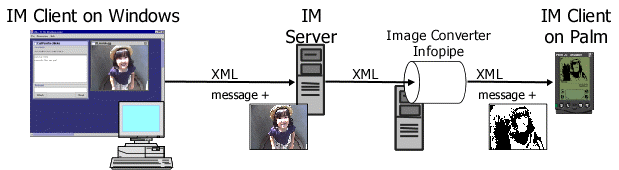
Figure 7 illustrates overview of the Image Converter Infopipe example. Messages are transferred from a client to another via a Jabber IM server. The IM client on PC, which client incorporates the image attachment functionality for this demonstration, may attach an image to a message for another IM client. Here, we assume the client the other side is a Palm device. In this case, the quality of an image should be adjusted to the requirement of the Palm device, which has only 160x160 pixel black and white display. Since such a networked appliance has only limited resources, it is desirable that the processing element is moved away from the client to the middle of infopipes, or wherever in the information flow that there is sufficient processing power.
In the actual demonstration in a presentation, which was held at College of Computing, Georgia Tech on August 30th, 2000, the author took a picture, which was 320x240 in JPEG, by a digital camera, and it was sent to the Palm device; it was successfully displayed on the Palm screen as a black and white picture of 160x120 pixel.
Figure 7: Scenario 1: The Use of Image Converter Infopipe
More particularly, the image attachment functionality is
implemented by adding some tags, such as image,
Content-Type and Content-Body, to the
original Jabber messaging stream. The attached image is encoded in
base64 and treated as a part of the XML stream. Since the enhanced
tags represent the type and the encoding format of image, the Image
Converter Infopipe and the receiver side client can do appropriate
procedures. The following is the example of the messaging stream that
includes an attached image (*3). (c.f. the example of the original
Jabber messaging XML stream in the Appendix. B)
<message>
  <subject>Testing of the Image attachment</subject>
  <body>Let me send an image for testing...</body>
  <image>
    <Content-Type>Image/Jpeg</Content-Type>
    <Content-Transfer-Encoding>base64</Content-Transfer-Encoding>
    <Content-Body>0M8R4KGxGuEAAAAAAAAAAAAAAAAAAAAAPgADA
P7/CQAGAAAAAAAAAAAAAAAaAAAAAQAAAAAAAAAAEAAAAwAAAAEA
...
5wMAAHQEAADyBAAAgAUAAO8FAAB8BgA</Content-Body>
  </image>
</message>
The Image Converter Infopipe does two things: one is to reduce the size and number of color for the Palm display, and the other is to move the base64 decoding function away from the Palm to the Infopipe because of the limited processing power. In the initial implementation, only the former function was performed by the infopipe, however, we moved the function to the Infopipe after we recognize that the significant overhead exists in the function. As Figure 8 illustrates, the JIM client for the Palm device retrieves a decoded image via HTTP; thereby, execution performance of the image attachment on the Palm device has become practical. The following is the the example of the messaging stream that includes the converted image by the Image Converter Infopipe.
<message>
  <subject>Testing of the Image attachment</subject>
  <body>Let me send an image for testing�c</body>
  <image>
    <Content-Type>Image/X-Bmp</Content-Type>
    <Content-Transfer-Encoding>X-URL</Content-Transfer-Encoding>
    <Content-Body>http://morimori.cc.gt.atl.ga.us/image.bmp</Content-Body>
  </image>
</message>
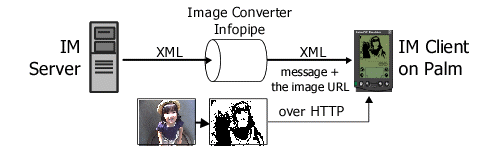
Figure 8: What does the Image Converter Infopipe do ?
The Infopipe Spec for the Image Converter Infopipe and the generated code are in the Appendix. C and D.
The goal of the scenario 2 is to demonstrate the usefulness of the ISG through the hands-on developing a message translator Infopipe, which is a kind of the simplest Infopipe in the environment. For instance, the message translator Infopipe can easily be implemented to change a string text "Hello!" in the messaging stream to a Japanese greeting word, "Kon Nichi Wa."
Actually, at the presentation on August 30th, 2000, the author showed the development steps in a couple of minutes, and the developed Infopipe successfully worked; with the message translator Infopipe, the receiver side client got a message "Kon Nichi Wa" when the other side sent a "Hello!" message.
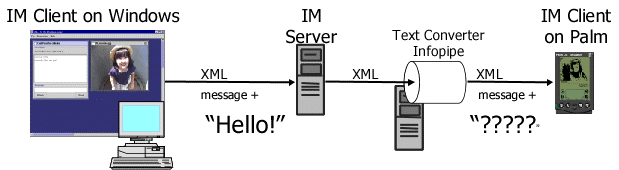
Figure 9: Scenario 2: Hands-on Developing the Message Translator Infopipe
The followings are the steps and code in this demonstration. First of all, the prepared Infopipe Spec was shown as follow:
<?xml version="1.0"?>
<!DOCTYPE InfopipeSpec SYSTEM "InfopipeSpec.dtd">
<InfopipeSpec id="TextConverter">
  <Method id="convert" match="body">
    <InoutArgs id="Inout">
       <Arg type="text" id="body">text()</Arg>
    </InoutArgs>
  </Method>
</InfopipeSpec>
Second, ISG was used to generate three Java files, a template for the Middle method class, the exception class and the Stub, from the Spec. Third, the author add just a couple of lines of code in the template for the Middle method as follow:
/**
 * This file is generated by InfopipeStubGenerator,
 * and supposes to be used as a template for your infopipe-middle
 *
 * @version $Id: demonstration.html,v 1.3 2000/09/13 07:38:10 morimori Exp $
 */

import org.w3c.dom.Node;
import org.w3c.dom.NodeList;

public class TextConverter {

    /**
     * inout arguments for convert()
     */
    public class Inout {
        public String body;
    }

    /**
     * method convert
     */
    public void convert(Inout inout) throws TextConverterException {
        if (inout.body.equals("Hello!")) {
            inout.body = new String("Kon Nichi Wa!");
        }
    }
}
Fourth, the three Java files were built with the Java compiler. Fifth, the IRT was executed with the class, and then JIM client was invoked to connect the Message Translator Infopipe.
Those above steps were done by the author at the presentation smoothly, and "Kon Nichi Wa" appeared in the JIM client's message display area.
(*3) In the ideal way for Jabber, the image attachment should be implemented by using the Jabber extension function that enables the developers of Jabber to add tags.