Proxy Web Logging and Search System
Part of the C2000 system deals with the logging of URL's visited in class and
their subsequent processing so that they may be displayed appropriately at the
end of the class. It is precisely for this purpose that a Proxy server is used.
The browsers in C2000 enabled classes are configured to 'go' via the Proxy. The
Proxy intercepts the URl's, logs them and if the requested Web-page is not
present in it's cache, it fetches it from the appropriate location. The C2000
Proxy server is a modified version of the Apache Web server built by the Apache
Group.
Earlier, a commercial product called 'Frontier' was used as a Web-logger but the
downside was that it only ran on Macintosh machines. This necessitated the
presence of at least one Macintosh in a C2000-enabled classroom leading to
considerable inflexibility. The Apache Proxy server on the other hand poses no
such constraints. In fact, the flexible caching options provided by the Proxy
alongwith it's potential use as a firewall have made it an ideal choice for this
project.
With this overview, let us have a look at the design aspects and data flow
involved.
High-level Architecture Diagram

Proxy Web Logging Sequence :
- The browser in a C2000-enabled class makes a Web request.
- The Proxy server receives the request and logs the URL.
- The Proxy checks its cache to see whether the requested page is present. If
it is, it takes the page from there; otherwise, a request is sent over the Net
as usual.
- When the page is brought in, the Proxy stores the page in it's cache.
- Modules process the URL interacting with the class and room files in the
process.
- This URL alongwith other information such as the date and time of logging
and the coursename and roomnumber of that class is stored in XML format in a
file.
Log Search Sequence :
- At the end of every C2000-enabled class StreamWeaver passes a request to a
CGI program for all the URL's visited in a particular class. It passes the
coursename as a parameter.
- The CGI program after parsing the query constructs an expression which is
used for the search.
- This expression is used by the sgrep utility to perform a search on the XML
file.
- The search results (in XML format) are passed back to StreamWeaver.
- StreamWeaver combines these results with other information such as slide
info, audio and video and outputs them to the client browser.
NOTE : In the future, we can envisage passing any number and type of
parameters to the CGI program for searching. The present system has been
developed keeping in mind this criterion and currently supports this
feature.
Installation Instructions for Webtracker v1.0
Download the source code here
Webtracker is an extension of the Apache Web server (v1.2.6) proxy module. For the instructions below, [base_directory] signifies the base directory where apache_1.2.6 would be installed. The setup in the downloaded code assumes /hm31/webtrack as the server base directory.
- Edit the configuration files httpd.conf, srm.conf and access.conf in the subdirectory called "conf".
- Go to the subdirectory "[base_directory]/apache_1.2.6/src". Open the file named constants. You will find, among other items, a list of files and their paths. Edit the paths as per your setup.
- Edit the files class_and_room.txt and room_ip_mapping.txt depending upon your setup. These files specify the courses conducted in classrooms at specified times and days and the IP addresses of machines in a classroom respectively.
Note : A list
of all files used in Webtracker and their paths is available.
- Compile the code.
- Go to [base_directory]/apache_1.2.6/src; type 'Configure' and then 'make' at the prompt. Refer to Apache documentation for help.
- Start the Server
- Type '[base_directory]/apache_1.2.6/src/httpd -f [base_directory]/apache_1.2.
6/conf/httpd.conf' at the prompt. You should be presented with a prompt straightaway.
This implies that all is well and the server is running. Alternatively, run the script named 'run_webtracker' from [base_directory]/apache_1.2.6. This will work for the base_directory /hm31/webtrack.
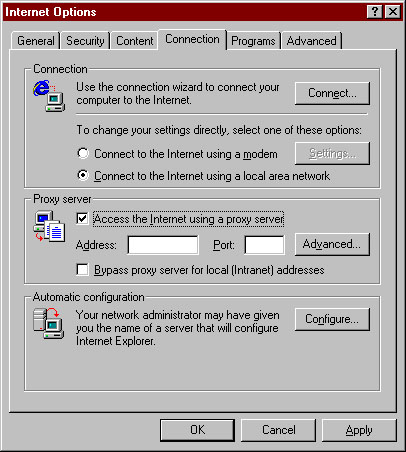
- You now need to go to the classroom browser machines and have them set up
to go via the Proxy. The port number can be configured using the configuration files
The Proxy address on the fce machine is fce.cc.gatech.edu and the port is 8010.
- Internet Explorer can be used by opening Internet Options.
- Netscape, or any other proxy-capable web browser, can also be used to acc
ess the proxy.

This completes the installation process.
If you would like to verify whether the system works, perform the following
steps :
- Surf a few sample sites on a Proxy-enabled browser.
- Log onto the fce machine. Switch to /hm31/webtrack/apache_1.2.6/logs. View
the file proxylog. It should contain records having the following structure for
each URL visited :
                  <entry>
                    <date>01/15/99</date>
                    <time>09:56:53 AM</time>
                    <hostname>dhcp12.gatech.edu</hostname>
                    <url>http://home.netscape.com/h.js</url>
                    <coursenumber>cs6751b_99_Winter</coursenumber>
                    <room>102</room>
                  </entry>
If a similar record exists, the proxy logging system works fine. If it does
not, please refer to the TroubleShooting
section of this page for help.
- To verify whether the search system works, start your browser. This browser
need not be Proxy-enabled. For demonstration purposes, we
shall assume that the date on which you surfed was 15 January, 1999.
Type in http://fce.cc.gatech.edu:8080/cgi-bin/c2k_search?date=01/15/99 in the
URL Location box.
- You should be able to see records with exacly the same structure as in 2.
above, but having only <date>01/15/99</date> as entries. What has actually happened is that a
search has been performed on the XML file and only those records which had been
logged on 15 January, 1999 have been selected and displayed.
- You can repeat the above procedure with any of the following keywords or any
combination thereof(provided it is in the standard CGI 'GET' query format) :
- date
- time
- hostname
- url
- coursenumber
- room
Troubleshooting Tips and FAQ's
- Help! The Proxy does not log requests!!
- Help! The Proxy logs requests but the browser complains that it is
'unable to connect to the server. The server may be down or
unreachable...'
- This can only mean one thing - the proxy server is down. Refer to Starting the Proxy Server section of this page.
for directions to start the Proxy server.
- Help! The Proxy logs requests but the browser cannot find the file /cgi-bin/c2k_search.
- The browser does not give any error but the display has only 3 lines :
<XML version = "1.0"?>
<proxylog>
</proxylog>
- This means that there is nothing wrong with the system. Check that your search query is correct. Also, make sure that you have actually
surfed some pages on the browser. Obviously, the search can't display nothing if there's nothing to search from!:)