This page lists the winning projects from last year’s (2005-2006) Tiger Team competition.
Bonfire
Jeremy Goecks and Chris Lee
-
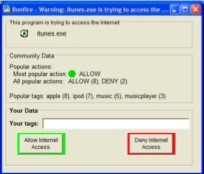
End-user tools for network security management are infamous for their lack of usability. Common firewalls, for instance, constantly interrupt users with requests to allow or deny connections to certain IP addresses and port numbers; users rarely know the “correct” answers to these questions, nor even what they mean in many cases. Likewise, techniques such as human comparison of hash codes to verify program integrity are difficult to use. To address these problem, the Bonfire Project is developing a new Internet firewall system that leverages collaborative filtering techniques, much like Flickr or del.icio.us bookmarks, coupled with a unique hash code visualization technique. When confronted with a network security decision, users can at-a-glance determine what others have done in similar situations, as well as look at “tags” others have used to mark particular programs; easy-to-describe hash code visualizations allow them to verify program integrity easily. This tool brings into the interface the formerly informal network of acquaintances that users often enlist (through phone calls or email) when making decisions about system configuration.


TALC
Travis Little and Kandha Sankarapandian
-
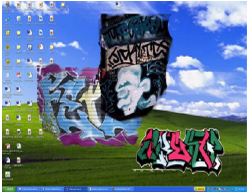
Users are often unaware of the threats they face from constant broadband connectivity. These threats—spyware, malware, and so forth—can arise from a number of system configuration details: is the users’ software fully patched? Is the firewall configured properly? Is the system running unnecessary services? Information about these configuration details are scattered throughout the system, and are thus difficult to locate; even when users do track them down, they are often unsure about what action to take to correct any threat. The TALC project, which stands for Threat Awareness, Learning, and Control, is developing an extensible tool that can perform real-time auditing of a range of aspects of system configuration (comparing, for example, installed software versions against CERT advisories). Identified network security weaknesses are then visualized directly and non-intrusively on the desktop as on-screen graffiti — users can perceive when their systems are becoming more and more at risk as the level of detritus rises. This tool also allows threat mitigation to be directly actionable — by clicking on the background, users are presented with an interface that allows them to remove the threat, “cleaning up” the on-screen graffiti.


Sesame
Jennifer Stoll and Craig Tashman
-
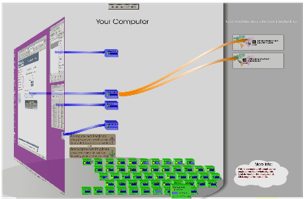
Although end-users are increasingly using networked applications and tools, the concepts that underly these tools are generally unknown to them. For example, although operating systems notions such as filesystems are viewed through the common metaphor of the direct manipulation, desktop interface (file, folder and disk icons, for example), networking details are not directly present in the desktop metaphor. Rather than directly manipulable graphical depictions of network connections, most tools only present us with textual messages describing IP addresses and port numbers. Bringing these concepts into the desktop metaphor is essential if we expect users to be able to understand and control the state of their machines with regard to network configuration and use. Thus, the Sesame project is developing a set of extensions to the common Windows-based desktop metaphor, which presents networking concepts in visual, easy-to-understand and easy-to-control terms. In the current prototype, users “lift up the hood” on their Windows desktop (using a 3D animated interface) to examine and control current network connections and parameters.