Krishna Bharat and Marc H. Brown
Visual Obliq consists of a GUI-builder for interactively designing an interface, and run-time support for handling distribution. The GUI-builder allows the user to construct the interface in a standard direct manipulation fashion, and to attach callback code to each widget. The callback code is written in an interpreted language, Obliq (Cardelli, 1994), and can access the Visual Obliq runtime library to handle issues specific to distributed computing. The user who is building the application can run it from within the GUI-builder, or can have the GUI-builder output a stand-alone executable program.
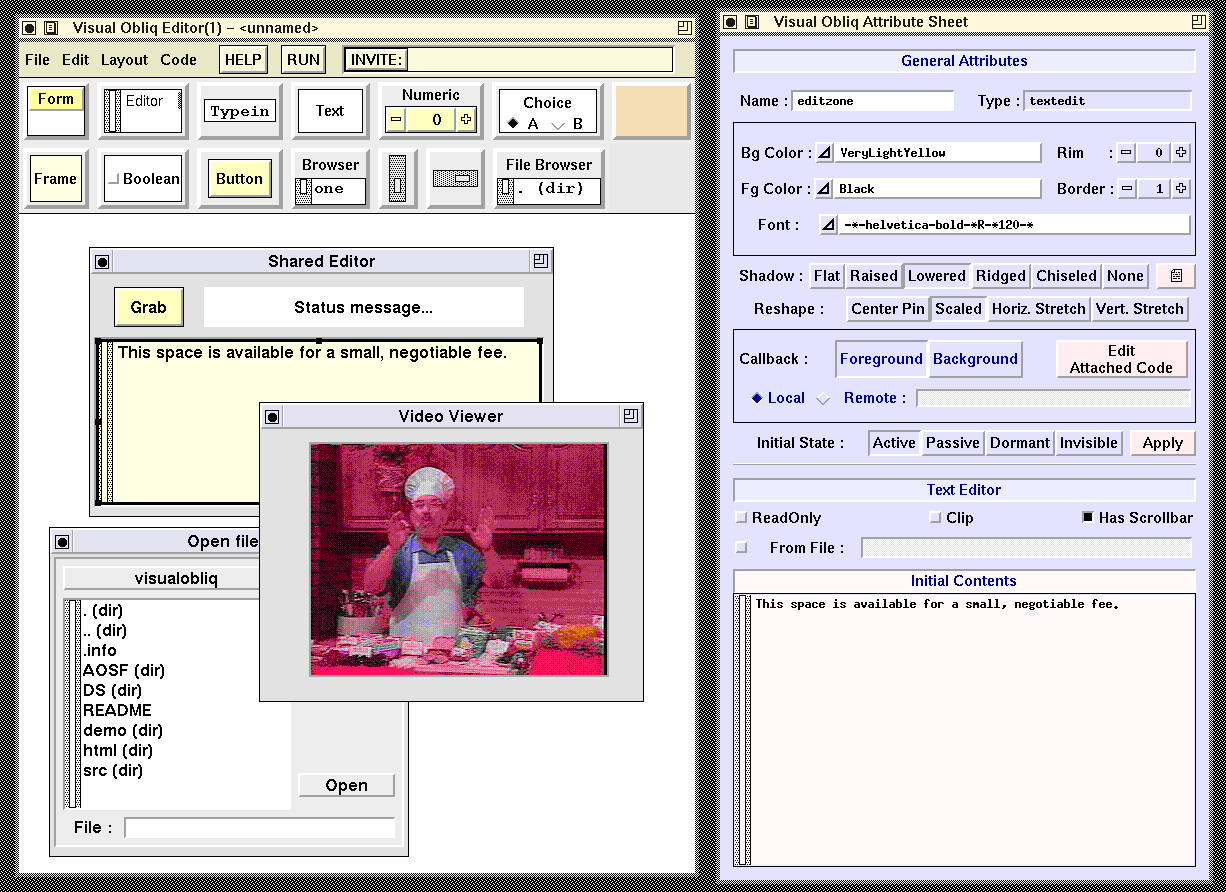
This screen dump shows the Visual Obliq GUI-builder while creating a shared-editor application, similar to the application developed in the video.
We believe that the abstractions provided, the simplicity of the programming model, the rapid turnaround time, and the applicability to heterogeneous environments, make Visual Obliq a viable tool for creating distributed applications.
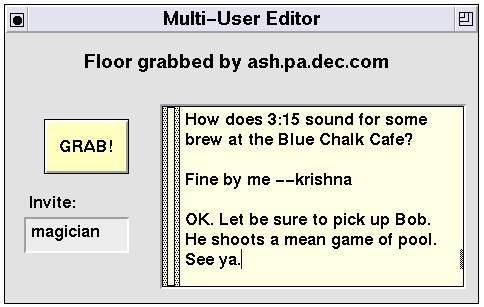
This screen dump shows the rudimentary multi-user editor constructed during the video.
An instance of this "form" appears at all client-sites. At any given time, at most one participant (i.e., a user at a client-site) "owns the floor," and this is the only client-site that is able to type into the text editor widget; the text editor widget on every other form-instance is passive (unresponsive to user input). Another user can grab the floor at any point by the "GRAB!" button. The typein field labeled "Invite:" allows participants to invite other users into the "session."
The named widgets in the form are as follows: w is the typein field; edit is the text editor; and msg is the status message at the top of the form. All of the callbacks are set to be run with mutual exclusion.
The top-level window has been given the name MUE. The heart of the system is that Visual Obliq maintains an array, named MUE, that contains a reference to all of the form-instances in the session. Each form-instance is located on a client-site, and client-sites may be on any machine in the Internet that is capable of running Obliq and Network Objects (Birrell et. al., 1993), the library that implements remote communication. Moreover, any client can access a component on any form-instance in a location-transparent manner. To a first approximation, any client-site could execute
MUE[3].edit.putText("Hi Mom!");
to store the string "Hi Mom!" into the widget named
edit at the client-site where the 3rd form-instance is running.
The callback to invite a new user into the session is as follows:
  let site = SELF.w.getText();
  installAt(site);
The library procedure installAt causes the application code to be copied to the new site and run there.
The callback for the text editor copies the entire contents of the editor to all other sites after every keystroke:
  let contents = SELF.edit.getText();
  foreach f in MUE do
    f.edit.putText(contents)
  end;
Finally, the callback for the "GRAB!" button is probably the most interesting: The status message at each client-site is updated appropriately, and then the text editor at each site is made passive, except for the site where the user clicked on the "GRAB!" button. This site is given by the variable SELF. Here is the actual Obliq callback code:
  foreach f in MUE do
    f.msg.putText( "Floor grabbed by " & LOCAL.HOSTNAME);
    if f isnot SELF then
      f.edit.makePassive()
    else
      f.edit.makeActive()
     end
  end;
Andrew D. Birrell, Greg Nelson, Susan Owicki, and Edward P. Wobber. Network Objects. In Proceedings of the 14th ACM Symposium on Operating System Principles, pages 217-230, December 1993. Also available as SRC Research Report 115.
Luca Cardelli. Obliq: A language with distributed scope. SRC Research Report 122 , Digital Equipment Corporation Systems Research Center, 130 Lytton Ave., Palo Alto, CA, June 1994.