

|
Spring Quarter 1996 Document Authors: Greg BrownChris Goodrum Derek Abiusi Project Sponsors: |
Cyberguide Team:
Nancy Barbiarz |
A basic set of services is provided to all users of the Cyberguide:
The guide has an awareness of its environment, tracking your current position, orientation, and the status of the wireless network. As you pass from one locale to the next, your guide interacts with the network to obtain the newest information available, and will proactively present the opportunity to take a pre-scripted tour.
The design of the Cyberguide has been made with an eye towards the future of mobile computing. Rather than deal with the constraints of current, and usually ephemeral, technologies, the design attempts to model an ideal system. Implementation details will have to be considered for each platform explored.
The cartographer is responsible for communication between the user and the map to provide functions involving the map that will be integrated into Cyberguide, as well as talking with the positioning system in order to display the current position of the user. There are certain functions that the will need to be preformed on the map one of which is scaling, or zooming in and zooming out. Another function that will be preformed on the map is the ability to filter out certain information that is contained within a map. For instance, when a user zooms out of a location, certain types of information should not be displayed, such as buildings or certain roads. As a user zooms in on a location, more detailed information will need to be displayed on the map. Without the ability to filter out certain items, a map can become cluttered with unnecessary information and make it difficult to read. An example would be: when viewing a map of the state of Georgia, buildings in downtown Atlanta do not need to be displayed. As the user zooms in on Atlanta, buildings and certain roads need to be included to make the map useful. A third function to be preformed on the map is path generation. The user can ask Cyberguide how to get from point to point on the map and Cyberguide will be able to generate a path the user can take. The map will also need to display the current location of the user of Cyberguide, and show the users location in relation to objects on the map, such as buildings and roads. The map will also contain "hotspots" by which the user can obtain information about objects on the map. These hotspots will be links to the librarian which will be responsible for getting the information to the user.
The librarian is the user's link to the information base in Cyberguide. By way of the librarian, the user can search for places, events or items of interest. The user should be able to search for a specific item or a broad range of topics. When the librarian returns the listing of topics that the user searched for, the user will be able to select the items of interest and receive information about these items. The librarian will be able to have the position of items on a map so the user will be able to ask: "How do I get to ....". The librarian will be able talk with the cartographer and plot a course for the user to take to reach his or her destination. The user will also be able to enter a random location and, if the location is contained in the database, the librarian will be able to generate a path to the location.
A third component of Cyberguide is the tour guide. The tour guide will contain prepackaged tours that a person who is new to an area can use. An example would be a tour of the airport which would contain a screen that has common destinations a person in an airport might have such as the baggage claim, rental cars, help desks or public transportation. The tour guide will communicate will the cartographer to plot a path to these prepackaged list items. The user will also be able to search for items that are not contained in a prepackaged tour by communicating with the librarian.
Another component of Cyberguide will be the network. The network will be responsible for communicating with a server that contains data and information that is needed by the Cyberguide unit. The communicator will be responsible for communications, such as e-mail, that will be integrated into Cyberguide. Included in this network will be a server that will contain all of the information that Cyberguide will need. When the librarian needs to get some information to show the user, the librarian will ask the server to provide the information. The librarian will then display the information to the user. Another function that the server will provided is the path generation. When the map requests a path be drawn, the map will consult with the server. Since the server know the location of all the places on a map, the server will best be able to generate a path that the user can use.
We have broken the Cyberguide design down into three levels and maintain a degree of independence between levels. These divisions have been made such that there is an obvious place to insert new functionality, and it can be done without having to make major changes to any other existing objects at that level.
User Interface
The objects at this level
provide an interface to the functions provided by Cyberguide, logically
arranged by function. These objects do not actually implement much of
Cyberguide's functionality, but rather expose it to the user‹acting
as an interface to the services provided at the Data and Services
level. There is not a one-to-one mapping of UI objects to
Data/Service objects; typically a UI object will utilize
services from a number of Data/Service objects. UI objects
combine and group the various services provided by Cyberguide in
meaningful ways, while allowing the services themselves to remain
isolated from one another.
Data and Services
Objects at
this level are the primary mediators between the user-level functions and
the system level services used to provide these functions. Objects at
this layer provide an API level interface to their services.
System
Objects at this layer are primarily interfaces to
system-level or machine-dependent functions such as communication or
position systems. This data is only used by objects at the Data and
Services level, which allows related information to be easily drawn from
a number of sources.
A clear description of the overall system
architecture is best represented in an object model:
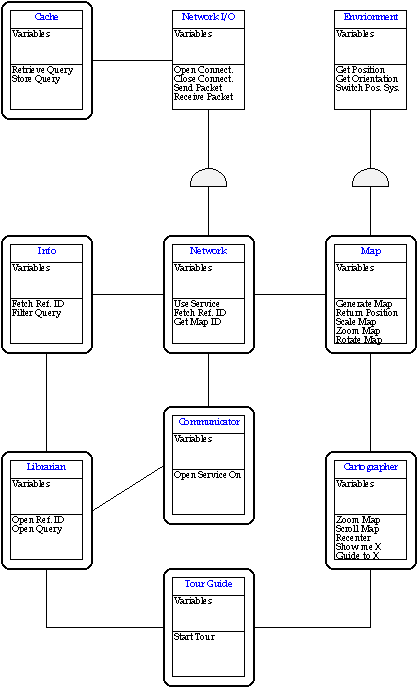
The representation to be used by Cyberguide holds the following information about each physical object:
Building
The map information will be retrieved from
a data server. The primary method for retrieving information from the
server will be specifying a node (typically the node in which the
Cyberguide is currently in) and all nodes located within an arbitrary
physical distance (dependant on the current scaling and zoom factor of
the map on the local unit).
Messages recognized by the Map object are all related to returning some form of physical positioning information. These are:
This returns the
current physical coordinates of the Cyberguide unit. It is used
primarily by the Cartographer object to determine which objects are to be
displayed at a given time.
Name:
The name of the place/event.
Category: A searchable tag
further identifying the place or event. A list of these needs to be
compiled given the type of data to be stored in the infobase.
Location: These are physical coordinates that need to be in sync
with the ones contained in the Map database.
Description: This is the textual description of the object which
is displayed when the object is displayed in the information
browser.
Similar To: A list of reference ID's to "similar"
objects. The primary use of this will be to allow a user to locate
locations or events that are similar to one that he or she is interested
in.
Additional Information: A number of additional resources
outside of the scope of the integrated information browser, most likely
pointers into services provided by the communications system. The
Librarian must be able to identify all of these possible tags and
make these services available to the user. Current types of additional
information fields include:
email - This mail address is used
by the Information Browser to send messages to the appropriate person for
this item.
url - This is used by the Information browser to
launch a web browser to a related website.
Network
The Network object provides an interface to the
various user and application level objects that require communications
services. All information queries, map segment queries, electronic mail,
http, and other network functions are served through the Network
object. Any new communications related tasks will require new code to be
added to the Network object.
When a network fetch request is received, the Network object first checks the data cache to see if the request duplicates a recently serviced query. If so, it merely pulls the information from its local storage. If not, it puts out a request to the server via the Network I/O object. Once the NIO returns the results of the query, the Network object adds the information to the cache and returns it to the calling object.
If the Network I/O object indicates that the external network is unavailable, the Network object will relay the message to the calling object, where it must be handled.
Cyberguide provides a series of icons, each repre pointers into services provided by the communicsenting one of the major user interface screens, which allow the user to jump from UI object to UI object at any time. Each UI object should remember whatever information it was displaying at the time, and retain this information whenever the user returns to that particular object.
Cartographer
The
Cartographer provides the primary interface to the Map object.
The cartographer receives position information relating to the current
physical location from the Map and displays it to the user. The
Cartographer also allows the user to "explore" the space around him or
her, retrieving information about specific objects from the information
base. The messages that the Cartographer can receive are:
- This message is sent typically only by an on
screen button which causes the Cartographer to adjust the bounds at which
it displays the current map.
Get
a name of a place from the user, query the database to bring up the
information record on that place.
See the usage
scenarios for details and examples of sample "tours" provided to the user
under certain circumstances.
The Tour Guide object is unique in
that it is rarely, if ever, invoked by another UI component - it's
functions are always requested by the user at this point. (Although
there is nothing in the design that would prevent it from being invoked
by another UI object)
This causes the Librarian to retrieve and display the
information record for the given reference id. "Links" may be
implemented in the Librarian browser through the use of these messages
embedded in the text.
This opens a simple inbox/outbox that retrieves
messages from the Cyberguide database server. It provides an email
gateway to the outside world, as well as communications between
Cyberguides. This can be used to alert the Cyberguide of some
time-sensitive event (Your table is ready, etc.). There should be an
indicator of some sort on the primary Cyberguide icon bar that a new
email message has come in.
Messages that the Communicator
understands consist of:
This is the
method in which the Communicator invokes these communications
services when used by itself‹it simply opens a default screen for
the service, such as an inbox/outbox for email, or a Web Browser to some
default page.
System Objects
Environment
The environment object is responsible for knowing where the
Cyberguide unit is at any given moment. This includes tracking which
positioning system should be used at any given time, in addition to
providing current positioning information to the other systems of
Cyberguide.
When a user moves from the outside, where it is using one positioning system, to inside, where another positioning system may be employed, Cyberguide has to be intelligent enough to switch positioning systems. A Cyberguide unit will know when one positioning system is not in use because the unit will no longer receive valid information from that positioning system. When this happens, the unit should switch to another available positioning system and determine if valid information is being received. If no available positioning system is receiving valid data, Cyberguide should continue to toggle between the available positioning systems until one detects a valid signal.
In addition to this method, there should also be an explicit "This positioning system is no longer valid" message that can be interpreted by Cyberguide if the user leaves a particular "zone". For example, when a Cyberguide enters a building, it should receive a "You are now entering X building" message from the positioning system used within that building, indicating that GPS (or other external positioning system) should no longer be used.
The Environment object is also responsible for doing any necessary
translations / transformations on the positioning data received by the
positioning hardware. When outdoors, the environment will give the
current position in some measurement of latitude and longitude, which
should match the position encoding done on the map. (1) There
also needs to be a standard for indoor use, such as meters or zones. It
will require that a new measurement system be encoded for each new method
of calculating position.
Each data item, be it a request for a map segment or an information query, will be preserved, along with the following information:
€ Query
€ Time of query
€
Size of query results
The Cache stores pointers to these
objects in a sorted list, and once the Cache has grown to its
maximum size the oldest information is discarded.
If the Cache does not contain the data object requested, it returns a negative response to the calling object.
For any implementation, the NIO object must provide the following services:
€ Opening a network connection
€
Closing a network connection
€ Sending a packet
€
Receiving a packet
An important concern in any wireless network
environment is insuring that the network client can determine if the
network is unavailable and properly return an error.
The map:
Many different functions are performed with the map as a resource. The cartographer communicates with the map to give the user the desired functionality that they demand. The cartographer tells the map when to: scale, zoom in or out, filter items, change maps. The environment object tells the map when the users position has been updated which direction the user is headed. The map talks with the information base when a hotspot on the map has been activated and information must be displayed.
The Librarian:
The librarian talks request's services from different objects, and provides service to objects that ask for them. The librarian talks to the information base to retrieve stored information about certain places and events. The librarian also talks to the map when users want a path drawn from place to place. The map has to know that it is going to be modified by having a path drawn on it. Also, the server needs to know that a path between two points has to be determined, so the librarian must communicate with the server. The librarian fulfills request for information from both the tour guide and the map. When a user requests information from a prepackaged tour, the tour guide asks the librarian to provide the necessary information. When the map object request information from a hotspot, the librarian needs to get the necessary information so it can be displayed.
The Tour Guide:
The tour guide talks mainly with the librarian and the cartographer. The tour guide needs to get information about prepackaged items, and in order to get the information, this object needs to communicate with the librarian. Also, when a user asks how to get to a particular place contained within a prepackaged tour, the tour guide needs to tell the cartographer that a path is going to be drawn on the map. In order for a path to be drawn, the tour guide needs to talk with the server so that the path can be calculated.
The primary areas
of functionality in the Cartographer/Map area impacted by
the use of an image based map:
Scaling - Scaling will not be
arbitrary, as in the "rendered-on-demand" map, but will have to be
limited to a set number of scales, each of which will probably have a
separate map image associated with it. It is possible for the Newton to
scale the image on demand, but this raises issues in the detail of the
information displayed.
Rotation - This cannot be easily or
efficiently done on an image based map. While rotating the map does make
it easier for the user to determine his or her orientation with respect
to surrounding objects, it is not essential functionality and can be
dropped.
Filtering - This issue is closely related to the
scaling issue. If a number of different maps are stored for display at
different scales, then the information in these images can be chosen such
that a reasonable level of information is displayed. It will not allow
the user to arbitrarily show or hide objects based on type, however.
Path Display - In order for paths to be displayed on an
image-based map, some coordinate information must be provided. It is
likely that this information should be a subset of the "full" set of map
information, and should contain just points of intersection for travel
nodes, such that a series of lines can be used to mark a path from one
point to another. The smaller representation of the map information
should be used to store the Database reference id's, so that none of this
data mapping information is encoded with pixel dimensions. (As is
currently done in the Newton implementation of Cyberguide)
Once the user gets to his or her car, they will need to find a hotel to stay in while they are in the area. The user turns to Cyberguide and there is an option in the prepackaged tour to select a hotel. The user tells Cyberguide to locate hotels located near the Georgia Tech campus, say within 5 miles. The tour guide will consult with the database that in located on the server to find the hotels that meet the users criteria. Again, the user will be able to browse through the list of hotels returned by the tour guide to find a suitable place to stay. The user can browse through prices, proximity to the campus and perks that the hotels may have to offer. The user can then select a hotel and ask the tour guide to display a path to the hotel. The tour guide consults with the server and the server provides a path and the map displays the route to the selected hotel.
After the user checks in to the hotel, they realize that they are running late for the GVU conference at Georgia Tech. The user uses his or her Cyberguide to e-mail Kurt Eiselt at the conference and explains their situation. The user then asks Cyberguide to display a path from the hotel to the Georgia Tech campus. When the user arrives at the conference, the positioning system will again switch to the indoor position system, assuming one exists at the GVU conference. The user is able to see his or her position on a map displayed on Cyberguide, and, if there are other Cyberguides present at the conference, the user will can also see their positions being updated.
After the conference is over, the user decides that he or she wants to relax, and they heard on the car radio that there was a Dogwood Festival today. The user asks the librarian to conduct a search on "Dogwood" and see what Cyberguide can find about the festival. The librarian consults with the information base located on the server and returns a few options for the user: The Dogwood Restaurant, Dogwood Avenue and the Dogwood Festival. The user selects the festival and notices that there is a web page for the festival. The user asks the librarian to download the page to the Cyberguide so more information can be learned. The user decides that they would like to attend this festival and selects the "Take me to . . . " option provided by the librarian. Cyberguide then draws a path from the user's location to the festival.
Database
Queries - The server(s) will be the primary location of database
information, including Librarian info records, map information and any
other service that involves database queries. Given some of the
requirements of the types of queries that will be needed, this is not an
area that needs to be glossed over.
Path Generation - At the
current time, finding an optimal path from one point to another is a
"hard" problem, one that is not reasonably solved on a typical hand-held
or portable computing device. For this reason, this functionality has
been offloaded to the server, which should be more capable of reasonably
solving this problem.
Communication - The server will also be
responsible for handling messaging between Cyberguides, and between a
Cyberguide and the outside world. This will more than likely just be a
mailbox on the server for each Cyberguide user, and will require that the
user identify themselves to the Cyberguide unit they are using. (A
simple implementation of this would use an existing POP mail server, and
would easily allow external communications)
It would also be
necessary that the Server track the location of other Cyberguides, so
that locating an active Cyberguide becomes less dependent on whether or
not that system is in current contact with the network.
Travel Mode Specific Path Generation: It would greatly increase both the complexity and the utility of the path generation mechanism of Cyberguide to be able to generate a number of different paths depending on which mode of transportation you were using. For example, the optimal path from one point to another would likely be different if you were driving than if you were walking. Travel-space nodes would need to be marked with some identifier determining which travel mode(s) they were applicable to. It would also be possible for information such as bus or train routes to be added into the Cyberguide database, but this adds the complexity of additional dependencies on which path is available at which time, and whether walking would be faster than taking the bus.
Scheduling & Suggested Itineraries: It is possible for the TourGuide to take a more interactive approach to guiding the user through a new area. On entering a new area, at the time during which the "pre-canned tours" are loaded, it could present the user with a list of which items are available in this area, and have the user select those that he or she find interesting. It could then suggest an "optimal" schedule for visiting all of these areas within a pre-specified amount of time. Additional information such as "recommended length of visit" would need to be added to the information records of places, (similar to a Travel Guide of some description).
Scheduling: Since Cyberguide is intended to be hosted on a portable platform of some type, it is likely that some form of time management / day planning functions are available for this platform. It would be interesting to integrate Cyberguide functionality into an intelligent-agent like system, having the suggested itineraries from the TourGuide incorporated into your calendar, and having the Cyberguide/PIM note your progress through the day's events, and offer to move or cancel events that you do not have time to make it to.
"Advanced"
Communications: There are a number of sources of information that are
available or will be available in the future that provide direct benefit
to Cyberguide. One of the most notable is Atlanta's "Intelligent
Highways" Project, which could provide information detailing the current
traffic conditions in various areas of the city. This information could
be incorporated into the route planning mechanism to compute the fastest
route given the current traffic conditions, to warn you of poor traffic
conditions before you encounter (and get stuck in) them, and to adjust
travel-time required between events in the Itinerary.
Traffic
conditions are not the only type of time-specific information that could
be useful - a system to have Cyberguide/PIM be able to schedule
reservations at restaurants and notify you if the restaurant is running
late would be a valuable addition to the possible Intelligent Agent
features of the Cyberguide/PIM.