J.A.V.A. Mail Reader Design Document

|
Winter Quarter 1996
Document Author: Project Sponsors: Gregory AbowdIan Smith |
The Just Another Version of Anarchy Team:
Brice Wilson (Manager/Programmer) |
|
|
Winter Quarter 1996
Document Author: Project Sponsors: Gregory AbowdIan Smith |
The Just Another Version of Anarchy Team:
Brice Wilson (Manager/Programmer) |
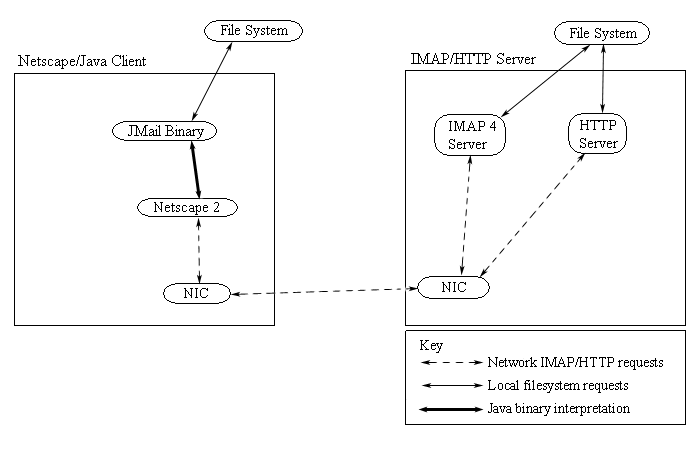
Figure 1: High Level Architecture of JAVA
Mail Application The JAVA applet is a means for users to gain access to their
mailboxes from any location where they have access to the World Wide Web
and Netscape 2.0 or other Java Beta capable browser. The benefit of using
the IMAP architecture is that it allows you to read mail messages
without downloading them to the local client. Therefore when a user switches
between machines to check their mail, they don't have to worry about whether
a certain message they need to read/reread is on that particular machine.
To access the JMail application, the user needs to access two things: a
Java Beta capable browser (Netscape 2), and an IP connection to a network
that has an IMAP/web server connected to it. Initially, the user makes an
HTTP request for the address of the JMail application (which currently
resides at
http://www-int.cc.gatech.edu/classes/CS3302.winter.96/java/
. On the web server (which is also the IMAP server), there resides the JMail
applet for the user to access. When the user goes to the location of the
JMail applet, the applet is downloaded to the machine that the user is running.
From this point, the user has the JMail binary on his/her machine, and the
Java browser executes the JMail binary. If any mail information is
required, the JMail binary makes a request via Ian Smith's Non Dairy
Creamer package to the IMAP server. The JMail application will also
need to access mail information on the local file system via folders. These
requests access data through the NDC package also, but will utilize the
local file system.
But what happens from the server's view? There are two type of requests
to the server that we are concerned with: IMAP, and HTTP protocol requests.
The HTTP requests that we are going to take advantage of are those that
request the Java executable binary be sent to the client. When theses are
received, the server will send the executable to the Netscape client
via the HTTP protocol. The IMAP requests that come in are handled
by the IMAP daemon. When they are recognized, the IMAP daemon goes to
the file system to retrieve the requested information. The server then
waits for another request from any IMAP client.
To better understand the classes we developed, it is best to read
the AWT classes that serve as the parents to the classes that
were written.
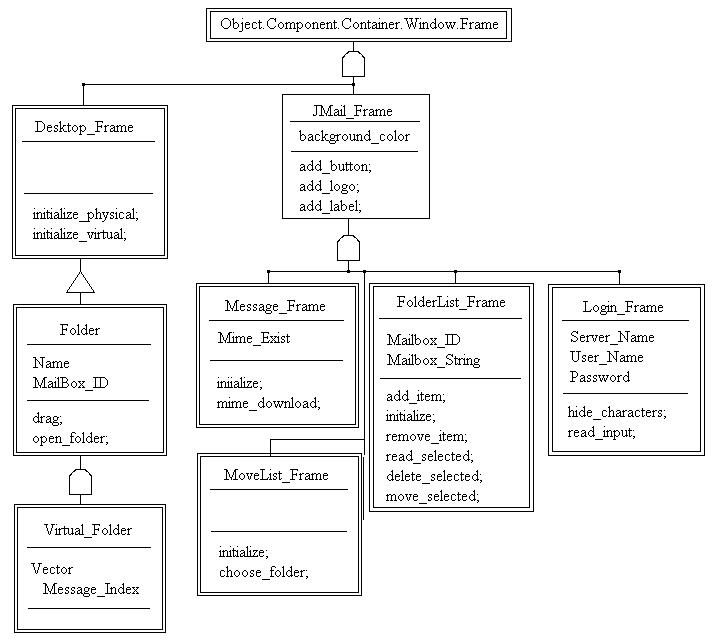
Figure 2: Object Representation of JAVA Interface
Classes
For a description of what a virtual folder is, please see the
requirements document.
3.0 Design Specification
The primary design work we needed to complete was in the area
of the interface. Ian Smith's Non Dairy Creamer classes were
used to access the data that was needed to display to the user.
To describe the classes we developed for the JMail reader, the
Coad/Nicola OOA representation was used.
4.0 Class Descriptions
In addition to the decription of these classes, the class definitions
produced by JavaDoc can be found in the
Guide to the Source Code
for the JMail project.
Desktop_Frame
(Subclass of Object.Component.Container.Window.Frame)
Constructors
Methods
JMail_Frame
(Subclass of Object.Component.Container.Window.Frame)
Attributes
Methods
FolderList_Frame
(Subclass of JMail_Frame)
Attributes
Constructors
Methods
Folder
(Part of Desktop_Frame)
Attributes
Constructors
Methods
Virtual_Folder
(Subclass of Folder)
Attributes
Constructors
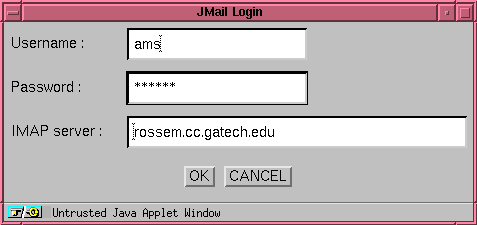
Figure 4: Prototype representation of login window that comes up immediately when application is loaded.
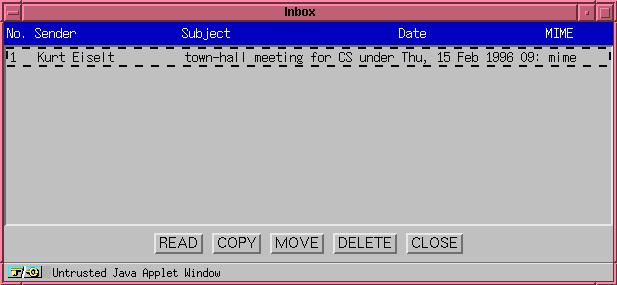
Figure 5: Prototype representation of List_Window object - that lists all the messages available in the chosen mailbox.
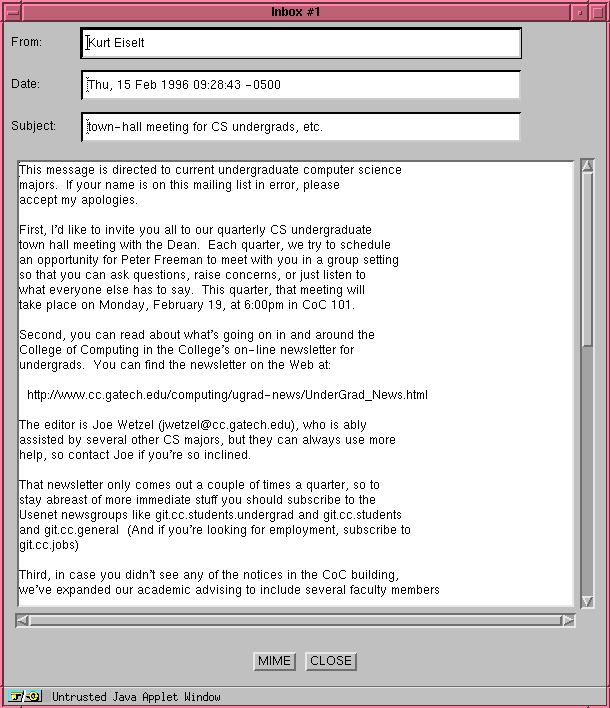
Figure 6: Prototype representation of the message window that is shown when a specific window is selected.