J.A.V.A. Mail Reader Design Document

|
Winter Quarter 1996
Document Author: Project Sponsors: Gregory AbowdIan Smith |
The Just Another Version of Anarchy Team:
Brice Wilson (Manager/Programmer) |
|
|
Winter Quarter 1996
Document Author: Project Sponsors: Gregory AbowdIan Smith |
The Just Another Version of Anarchy Team:
Brice Wilson (Manager/Programmer) |
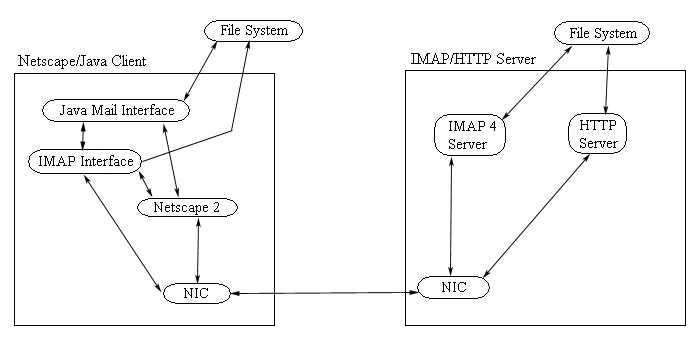
Figure 1: High Level Architecture of JAVA
Mail Application The JAVA applet is a means for users to gain access to their
mailboxes from any location where they have access to the World Wide Web
and Netscape 2.0 or other Java Beta capable browser. The benefit of using
the IMAP architecture is that it allows you to read mail messages
without downloading them to the local client. Therefore when a user switches
between machines to check their mail, they don't have to worry about whether
a certain message they need to read/reread is on that particular machine. The users of the JAVA mail reader only need two
things: Netscape 2 (Java capable browser) and the desktop metaphor JAVA
mail applet. Whenever the user makes a request for the mail message information,
the JAVA mail applet accesses Ian Smith's IMAP classes
which actually produces requests for the IMAP server. The request travels
through the NIC (Network Interface Card) to the network. When a response
is received, the data is passed back to the JAVA mail interface
throughthe IMAP classes. The data is then displayed to the user via the
JAVA interface classes. But what happens from the server's view? There are two type of requests
to the server that we are concerned with: IMAP, and HTTP protocol requests.
The HTTP requests that we are going to take advantage of are those
that request the JAVA binary executable be sent to the client. When
these are received, the server will send the executable to the Netscape
client via the HTTP protocol. The IMAP requests that come in
are handled by the IMAP daemon. When they are recognized, the IMAP
daemon goes to the file system to retrieve the requested information. The
server then returns the message information to the client. The server then
waits for another request from any IMAP client.
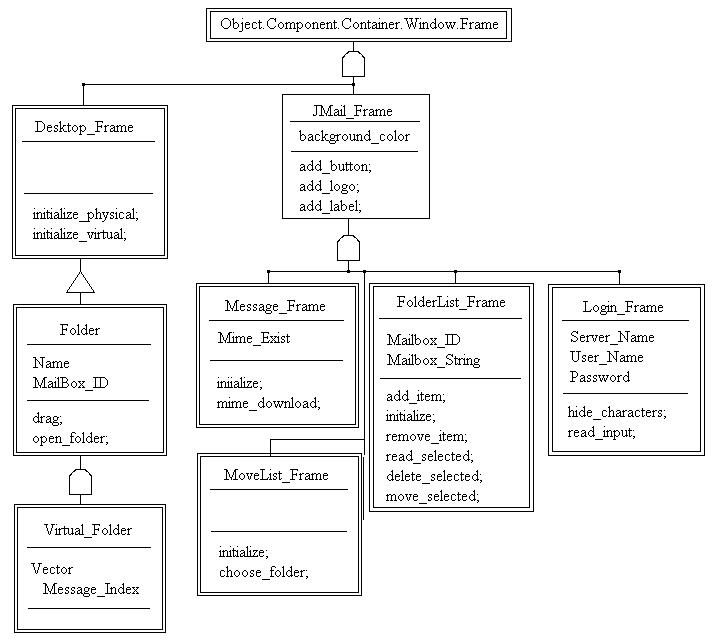
Figure 2: Object Representation of JAVA Interface
Classes
The User interface for the JAVA email reader is to resemble a
desktop metaphor where the user can have multiple folders, and messages
open all at the same time. The interface is going to be made to resemble
the Macintosh OS more than any other type of Desktop. Prototypes for all
of the windows except for the desktop have been prototyped under Unix in
a GUI designer called XForms. The final interface will not look exactly
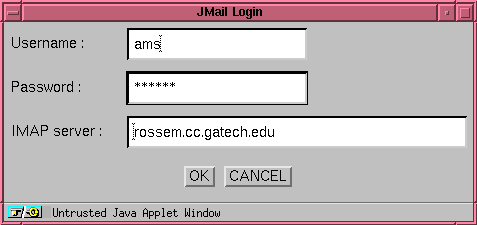
the same because the widgets have a different appearance than the AWT widgets. Figure 4: Prototype representation of login
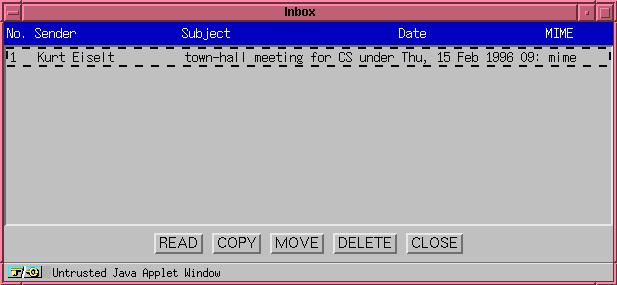
window that comes up immediately when application is loaded. Figure 5: Prototype representation of List_Window
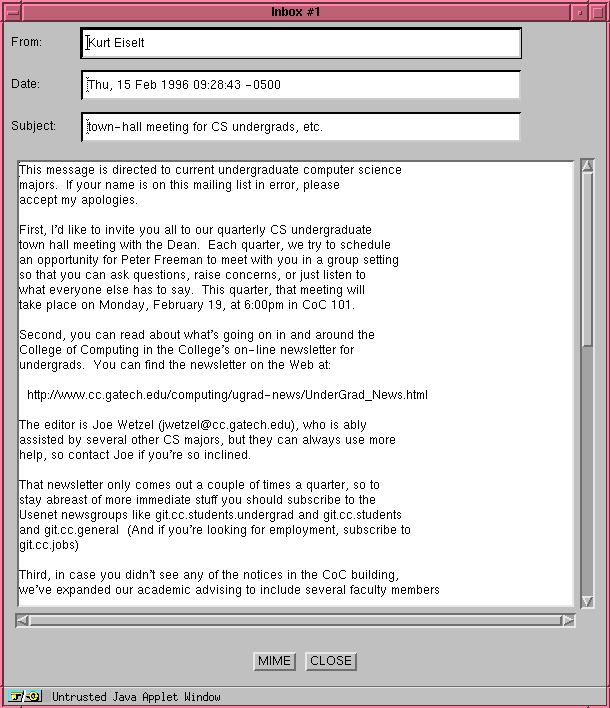
object - that lists all the messages available in the chosen mailbox. Figure 6: Prototype representation of the message
window that is shown when a specific window is selected.
3.0 Design Specification
4.0 Class Descriptions
Desktop_Frame
(Subclass of Object.Component.Container.Window.Frame)
Constructors
Methods
JMail_Frame
(Subclass of Object.Component.Container.Window.Frame)
Attributes
Methods
FolderList_Frame
(Subclass of JMail_Frame)
Attributes
Constructors
Methods
Folder
(Part of Desktop_Frame)
Attributes
Constructors
Methods
Virtual_Folder
(Subclass of Folder)
Attributes
Constructors
5.0 User Interface
Link
to J.A.V.A. Project Notebook
Last Modified 2/9/96 -- Joel Furnsinn